Templates · Settings screens · Travel app · Keycard
Keycard Settings screen
A settings screen from Keycard, a travel app template in a Luxury style. Screen 25 of 25.
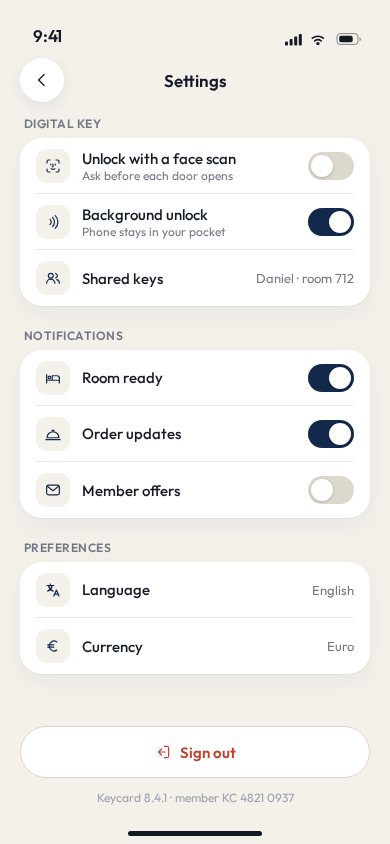
Keycard is a complete hotel stay app: welcome, sign in, a home built around the stay you are in, search, results, a hotel page, room rates, booking review and confirmation, your stays, a stay with its details, mobile check in, a digital room key, in room dining with a dish, an order and live order status, a chat with the front desk, housekeeping requests, the bill, rewards with elite status, a paid Reserve membership, notifications, profile and settings. Linen and white with harbour navy and burnished copper.
| Detail | Value |
|---|---|
| Screen type | Settings |
| App | Keycard: Hotel stays, digital key and room service |
| Category | Travel |
| Design language | Luxury, light |
| Type | Instrument Serif for headings, Outfit for text |
| Colours | #f4f1eb background, #ffffff surface, #141a24 text, #737785 text-muted, #b5683f accent, #ffffff accent-contrast, #13294b secondary, #e5e0d6 border, #c0432f danger |
What this screen says
- Settings
- DIGITAL KEY
- Unlock with a face scan
- Ask before each door opens
- Background unlock
- Phone stays in your pocket
- Shared keys
- Daniel · room 712
- NOTIFICATIONS
- Room ready
- Order updates
- Member offers
- PREFERENCES
- Language
- English
- Currency
- Euro
- Sign out
- Keycard 8.4.1 · member KC 4821 0937
Around it in Keycard
More settings screens
- Hollow Settings: Cabin and boutique stays
- Aloft Settings: Flight tracker
- Pitch Settings: Campsite booking and trip kit
- Hail Settings: Ride hailing
- Volta Settings: EV charging
- Museo Settings: Museum guide
- Roamly Settings: Trips, stays and experiences
- Jaunt Settings: Bus, train and flight booking
- Spoke Settings: Bike sharing
- Navara Settings: Yacht charter
- Voya Settings: Travel booking
- Wheelhouse Settings: Driver app for ride hailing
Every travel app settings screen
What makes a good settings screen
- Group options into clear sections. Account, notifications, privacy, appearance and help, with headings, so people scan to the right group.
- Label settings by their effect. "Daily reminder at 8:00" is clearer than "Reminders". Add a short description under options that need one.
- Use the right control. Toggles for on and off, a row that opens a list for choices, and sliders only for ranges.
- Apply changes immediately. Most mobile settings take effect when changed, with no Save button to forget.
The full settings screen guide and every example
Remix Keycard free: describe your own app and it is drawn in this design. Or get its files from $10: Figma, React Native, SwiftUI, Flutter and HTML.