Templates · Settings screens · Travel app · Omnia
Omnia Settings screen
A settings screen from Omnia, a travel app template in a Playful style. Screen 25 of 25.
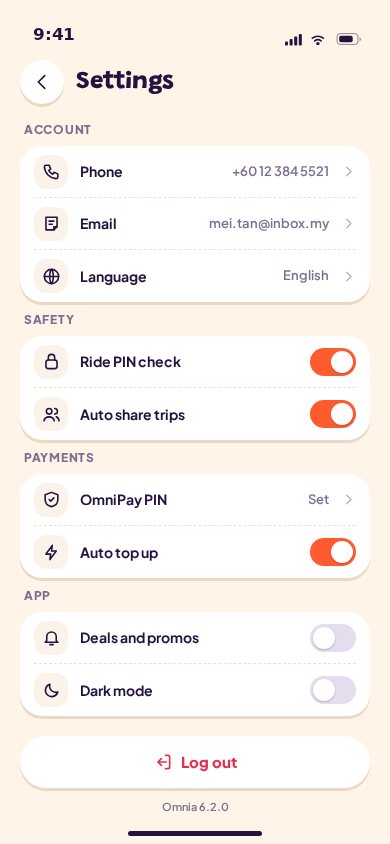
Omnia is a complete everyday super app set in Kuala Lumpur: welcome, phone sign in with an SMS code, a home with the wallet, Orbs and a grid of service tiles, where to, choosing a car or bike on a route map, a live driver arriving screen and a trip rating with tips, food browse, a restaurant, dish options, cart, live order tracking and delivered, a grocery mart, sending a parcel, the wallet with spending by service, scan to pay at a stall, pay a merchant and a receipt, rewards, vouchers, activity, a Plus membership, profile and settings. Apricot cream with persimmon, grape and sunflower.
| Detail | Value |
|---|---|
| Screen type | Settings |
| App | Omnia: Super app for rides, food and payments |
| Category | Travel |
| Design language | Playful, light |
| Type | Grandstander for headings, Plus Jakarta Sans for text |
| Colours | #fff4e8 background, #ffffff surface, #24123f text, #7d6f8f text-muted, #ff5b2e accent, #ffffff accent-contrast, #6c4cf5 secondary, #f0dfcc border, #e5304f danger |
What this screen says
- Settings
- ACCOUNT
- Phone +60 12 384 5521
- Email mei.tan@inbox.my
- Language English
- SAFETY
- Ride PIN check
- Auto share trips
- PAYMENTS
- OmniPay PIN Set
- Auto top up
- APP
- Deals and promos
- Dark mode
- Log out
- Omnia 6.2.0
Around it in Omnia
More settings screens
- Kerb Settings: Parking that reads like a road sign
- Linea Settings: City transit
- Hollow Settings: Cabin and boutique stays
- Aloft Settings: Flight tracker
- Pitch Settings: Campsite booking and trip kit
- Hail Settings: Ride hailing
- Volta Settings: EV charging
- Museo Settings: Museum guide
- Roamly Settings: Trips, stays and experiences
- Jaunt Settings: Bus, train and flight booking
- Spoke Settings: Bike sharing
- Navara Settings: Yacht charter
Every travel app settings screen
What makes a good settings screen
- Group options into clear sections. Account, notifications, privacy, appearance and help, with headings, so people scan to the right group.
- Label settings by their effect. "Daily reminder at 8:00" is clearer than "Reminders". Add a short description under options that need one.
- Use the right control. Toggles for on and off, a row that opens a list for choices, and sliders only for ranges.
- Apply changes immediately. Most mobile settings take effect when changed, with no Save button to forget.
The full settings screen guide and every example
Remix Omnia free: describe your own app and it is drawn in this design. Or get its files from $10: Figma, React Native, SwiftUI, Flutter and HTML.