Templates · Profile screens · Smart home app · Abode
Abode Profile screen
A profile screen from Abode, a smart home devices app template in a Minimal style. Screen 24 of 25.
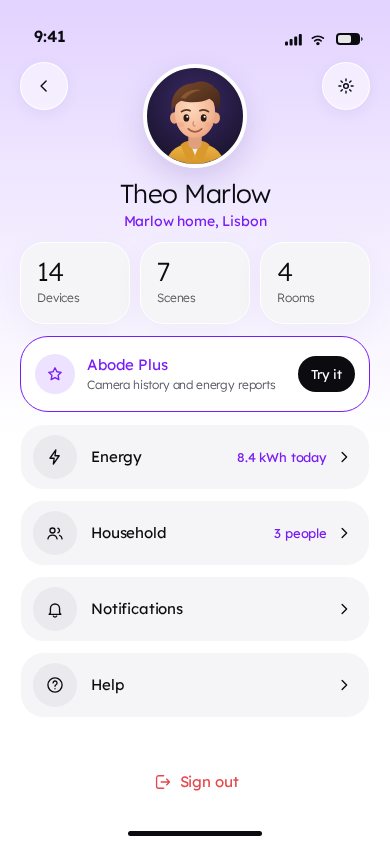
Abode is a complete smart home app centred on devices: welcome, sign in and a code, a home with the weather, what is playing, quick access and favourite scenes, every device by room, detailed controls for the air conditioner, TV, speaker, robot vacuum, lights and blinds, timers, pairing a new device, scenes you can build and run, a weekly schedule, energy use, a plan, profile and settings. White and pale grey with a lilac wash, electric violet and black.
| Detail | Value |
|---|---|
| Screen type | Profile |
| App | Abode: Smart home devices |
| Category | Smart home |
| Design language | Minimal, light |
| Type | Lexend |
| Colours | #ffffff background, #f5f5f7 surface, #0c0c10 text, #74747f text-muted, #7a1cf5 accent, #ffffff accent-contrast, #ece2ff secondary, #e9e9ee border, #e5484d danger |
What this screen says
- Theo Marlow
- Marlow home, Lisbon
- Devices
- Scenes
- Rooms
- Abode Plus
- Camera history and energy reports
- Try it
- Energy
- 8.4 kWh today
- Household
- 3 people
- Notifications
- Help
- Sign out
Around it in Abode
More profile screens
- Boxed Mover: Book movers and plan moving day
- Meter Account: Your energy supplier account
- Couch Profiles: TV remote, casting and watchlist
- Chime Profile: Voice assistant and smart speaker
- Latch Guest: Smart locks and guest access
- Mesh Account: Home Wi-Fi network
- Decibel Account: Multi-room speakers
- Nursery Profile: Baby monitor camera and sleep
- Porch Household: Home security cameras
- Sundial Profile: Solar panels and home battery
- Puddle Profile: Garden watering and sprinklers
- Upkeep Profile: Home maintenance calendar
Every smart home app profile screen
What makes a good profile screen
- Lead with identity. Photo, name and one line about the person at the top. It confirms whose profile this is.
- Show meaningful stats. Two to four numbers that matter in this app, like workouts, followers, books read or streak.
- Make editing obvious for the owner. An Edit profile button near the top, shown only on your own profile.
- Organise content with tabs. Posts, activity, saved or achievements as tabs keep a long profile tidy.
The full profile screen guide and every example
Remix Abode free: describe your own app and it is drawn in this design. Or get its files from $10: Figma, React Native, SwiftUI, Flutter and HTML.