Templates · Settings screens · Lifestyle app · Torque
Torque Settings screen
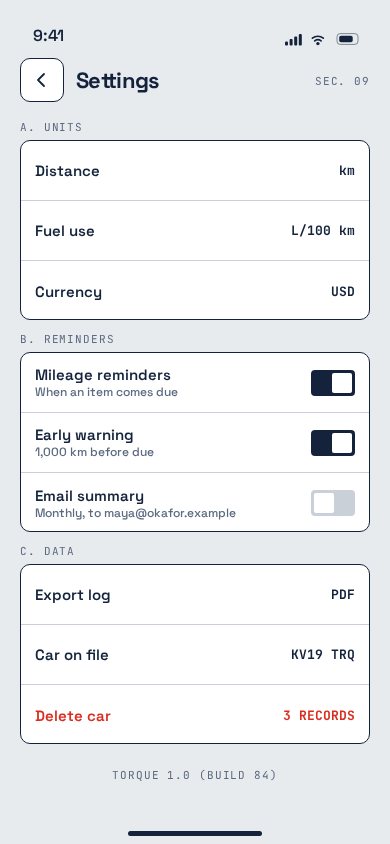
A settings screen from Torque, a lifestyle app template in an Enterprise style. Screen 25 of 25.
Torque is torque keeps one car's service history, mileage based reminders, parts, fuel fill ups and running costs. It also books a garage slot and explains every dashboard warning light.
| Detail | Value |
|---|---|
| Screen type | Settings |
| App | Torque: The workshop manual for your own car |
| Category | Lifestyle |
| Design language | Enterprise, light |
| Type | Space Grotesk |
| Colours | #e8ebee background, #ffffff surface, #14233b text, #5b6a80 text-muted, #ff6a13 accent, #ffffff accent-contrast, #22375a secondary, #c9d0d8 border, #d92d20 danger |
What this screen says
- Settings
- SEC. 09 A. UNITS
- Distancekm
- Fuel useL/100 km
- CurrencyUSD
- B. REMINDERS
- Mileage remindersWhen an item comes due
- Early warning1,000 km before due
- Email summaryMonthly, to maya@okafor.example
- C. DATA
- Export logPDF
- Car on fileKV19 TRQ
- Delete car3 RECORDS
- TORQUE 1.0 (BUILD 84)
Around it in Torque
More settings screens
- Postage Settings: Send parcels and find drop-off points
- Specs Settings: Glasses with virtual try-on
- Circuit Settings: Electronics store with trade-in and repairs
- Provenance Settings: Authenticated luxury resale
- Gavel Settings: Live online auctions
- Tidy Settings: Book home cleaners
- Dorm Settings: Find student housing
- Hem Settings: Tailoring and alterations, collected
- Lendly Settings: Borrow things from neighbours
- Stub Settings: Fan to fan ticket resale
- Trove Settings: Visual ideas and boards
- Vidi Settings: Video platform for creators
Every lifestyle app settings screen
What makes a good settings screen
- Group options into clear sections. Account, notifications, privacy, appearance and help, with headings, so people scan to the right group.
- Label settings by their effect. "Daily reminder at 8:00" is clearer than "Reminders". Add a short description under options that need one.
- Use the right control. Toggles for on and off, a row that opens a list for choices, and sliders only for ranges.
- Apply changes immediately. Most mobile settings take effect when changed, with no Save button to forget.
The full settings screen guide and every example
Remix Torque free: describe your own app and it is drawn in this design. Or get its files from $10: Figma, React Native, SwiftUI, Flutter and HTML.