Templates · Home screens · Travel app · Tern
Tern Home screen
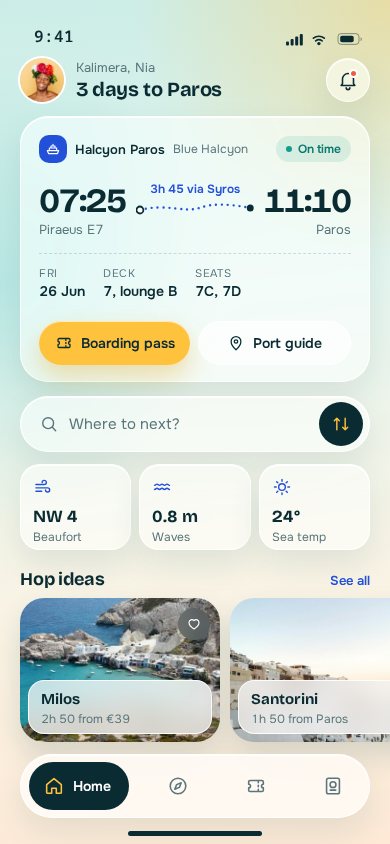
A home screen from Tern, a ferry and island hopping app template in a Glass style. Screen 3 of 25.
Tern is a complete ferry and island hopping app: welcome, sign in, a home with the next sailing and sea conditions, route search, sailings, a sailing with its stops and vessel, seats on deck, passengers, extras, checkout and a booked screen, trips, a boarding pass, a live map of the crossing, a port guide, rebooking after a wind cancellation, a multi island hop planner, explore and island guides, a sea forecast, a sailing passport, notifications, a pass plan, profile and settings. Sea glass and sand with frosted glass, sun yellow and Aegean blue.
| Detail | Value |
|---|---|
| Screen type | Home |
| App | Tern: Ferry and island hopping |
| Category | Travel |
| Design language | Glass, light |
| Type | Bricolage Grotesque for headings, Onest for text |
| Colours | #e5f5ef background, #ffffff surface, #0b2b33 text, #5a767c text-muted, #ffc23d accent, #0b2b33 accent-contrast, #2350d8 secondary, #d8e6e3 border, #f05a3f danger, #0f9e8e success |
What this screen says
- Kalimera, Nia
- 3 days to Paros
- Halcyon Paros Blue Halcyon
- On time
- 07:25Piraeus E7
- 3h 45 via Syros
- 11:10Paros
- Fri
- 26 Jun
- Deck
- 7, lounge B
- Seats
- 7C, 7D
- Boarding pass
- Port guide
- Where to next?
- NW 4
- Beaufort
- 0.8 m
- Waves
- 24°
- Sea temp
- Hop ideas
- See all
- Milos
- 2h 50 from €39
- Santorini
- 1h 50 from Paros
- Home
Around it in Tern
More home screens
- Manifest Home: Trip plans from your confirmation emails
- Roadster Car: Your electric car, from your phone
- Fairground Home: Theme park tickets, wait times and map
- Scoot Map: E-scooter and e-bike rental
- Nomad Explore: Travel eSIM data plans
- Berth Home: Night trains and sleeper cabins
- Caravan Home: Campervan rental and road trips
- Layover Home: Airport guide, gates and lounges
- Permit Wallet: Visas and travel documents wallet
- Backroad Home: Road trip planner with stops
- Bunk Home: Hostels and backpacker meetups
- Piazza Today: Self-guided city walking tours
What makes a good home screen
- Put the most important thing first. Decide the one thing most people come for, like today's workout, a balance or the next booking, and give it the top of the screen.
- Make it feel current. Greetings with the time of day, today's date, fresh numbers and recent activity tell people the app is alive and about them.
- Keep quick actions within thumb reach. The two or three things people do most should be one tap away, in the lower part of the screen or a floating button.
- Group related content in clear sections. Use headings and spacing so the screen scans as a few blocks, not a long mixed list.
The full home screen guide and every example
Remix Tern free: describe your own app and it is drawn in this design. Or get its files from $10: Figma, React Native, SwiftUI, Flutter and HTML.