Templates · Home screens · Travel app · Backroad
Backroad Home screen
A home screen from Backroad, a road trip planner with stops app template in a Neubrutalism style. Screen 4 of 25.
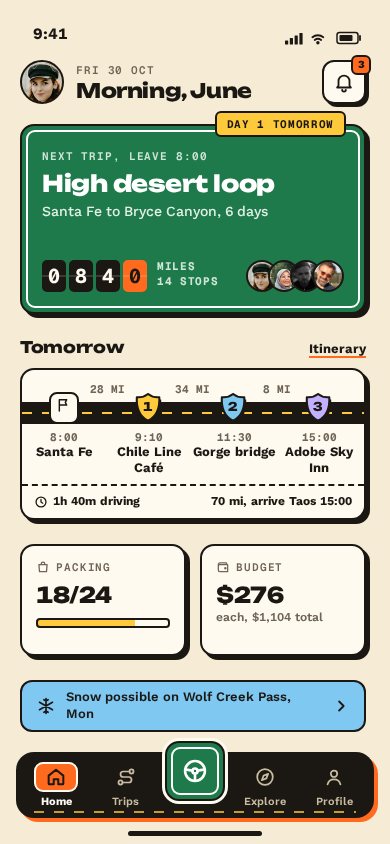
Backroad is a complete road trip planner: welcome, travel style, sign in, a home with tomorrow's drive, trips, a trip map, a day by day itinerary on a road ribbon, stops along the route, search, a stop, adding a stop and a new trip, the shared budget, road stats, booking a motel with review and a confirmation key tag, live drive mode, a postcard maker, the crew, a packing list, notifications, Backroad Plus, profile and settings. Sand and cream with ink outlines, cone orange, highway green and a dashed yellow centre line.
| Detail | Value |
|---|---|
| Screen type | Home |
| App | Backroad: Road trip planner with stops |
| Category | Travel |
| Design language | Neubrutalism, light |
| Type | Unbounded for headings, Work Sans for text |
| Colours | #f6ecd6 background, #fffaf0 surface, #1b1814 text, #6f6556 text-muted, #ff6a1f accent, #1b1814 accent-contrast, #1e7a4a secondary, #1b1814 border, #e0392b danger |
What this screen says
- Fri 30 Oct
- Morning, June
- DAY 1 TOMORROW Next trip, leave 8:00
- High desert loop
- Santa Fe to Bryce Canyon, 6 days
- 0840 MILES
- 14 STOPS
- Tomorrow
- Itinerary
- 28 MI 34 MI 8 MI
- 8:00Santa Fe
- 9:10Chile Line Café
- 11:30Gorge bridge
- 15:00Adobe Sky Inn
- 1h 40m driving 70 mi, arrive Taos 15:00
- Packing 18/24
- Budget $276
- each, $1,104 total
- Snow possible on Wolf Creek Pass, Mon
- Home
- Trips
- Explore
- Profile
Around it in Backroad
More home screens
- Berth Home: Night trains and sleeper cabins
- Caravan Home: Campervan rental and road trips
- Layover Home: Airport guide, gates and lounges
- Permit Wallet: Visas and travel documents wallet
- Bunk Home: Hostels and backpacker meetups
- Piazza Today: Self-guided city walking tours
- Fjord Today: Cruise companion on board
- Atlas Map: Maps and navigation
- Kerb Map: Parking that reads like a road sign
- Linea Home: City transit
- Hollow Explore: Cabin and boutique stays
- Aloft Home: Flight tracker
What makes a good home screen
- Put the most important thing first. Decide the one thing most people come for, like today's workout, a balance or the next booking, and give it the top of the screen.
- Make it feel current. Greetings with the time of day, today's date, fresh numbers and recent activity tell people the app is alive and about them.
- Keep quick actions within thumb reach. The two or three things people do most should be one tap away, in the lower part of the screen or a floating button.
- Group related content in clear sections. Use headings and spacing so the screen scans as a few blocks, not a long mixed list.
The full home screen guide and every example
Remix Backroad free: describe your own app and it is drawn in this design. Or get its files from $10: Figma, React Native, SwiftUI, Flutter and HTML.