Templates · Home screens · Travel app · Piazza
Piazza Today screen
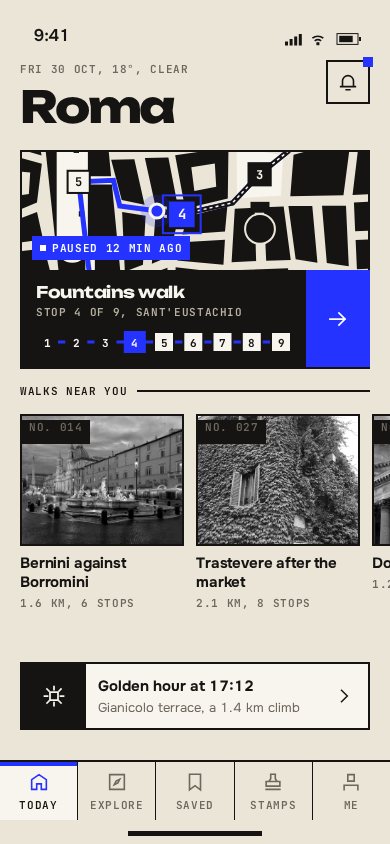
A home screen from Piazza, a self-guided city walking tours app template in a Brutalist style. Screen 4 of 25.
Piazza is a complete walking tour app: welcome, choose a city, sign in, a today screen with the walk in progress, explore and search, tour lists and a tour page, the full route map, a stop page, buying a tour and unlocking it, live walking with turn by turn, the audio guide, a photo spot camera, a finished walk with a rating, a build your own walk planner, saved tours, a passport of piazza stamps, walking stats, offline maps, notifications, the Piazza Pass plan, profile and settings. Travertine, ink black and one ultramarine route line.
| Detail | Value |
|---|---|
| Screen type | Home |
| App | Piazza: Self-guided city walking tours |
| Category | Travel |
| Design language | Brutalist, light |
| Type | Unbounded for headings, Onest for text |
| Colours | #ebe5d8 background, #f8f5ee surface, #161412 text, #6e675c text-muted, #2433ff accent, #ffffff accent-contrast, #d6cdbc secondary, #161412 border, #e0401f danger |
What this screen says
- Fri 30 Oct, 18°, clear
- Roma
- Paused 12 min ago
- Fountains walkStop 4 of 9, Sant'Eustachio
- Walks near you
- No. 014
- Bernini against Borromini1.6 km, 6 stops
- No. 027
- Trastevere after the market2.1 km, 8 stops
- No. 003
- Domes and drums1.2 km, 5 stops
- Golden hour at 17:12Gianicolo terrace, a 1.4 km climb
- Today
- Explore
- Saved
- Stamps
- Me
Around it in Piazza
More home screens
- Volta Home: EV charging
- Museo Today: Museum guide
- Roamly Home: Trips, stays and experiences
- Jaunt Home: Bus, train and flight booking
- Spoke Home: Bike sharing
- Navara Home: Yacht charter
- Voya Home: Travel booking
- Wheelhouse Home: Driver app for ride hailing
- Fuelup Home: Pay at the pump and car wash
- Omnia Home: Super app for rides, food and payments
- Staya Explore: Homes and stays from local hosts
- Lodge Home: Hotels, deals and reservations
What makes a good home screen
- Put the most important thing first. Decide the one thing most people come for, like today's workout, a balance or the next booking, and give it the top of the screen.
- Make it feel current. Greetings with the time of day, today's date, fresh numbers and recent activity tell people the app is alive and about them.
- Keep quick actions within thumb reach. The two or three things people do most should be one tap away, in the lower part of the screen or a floating button.
- Group related content in clear sections. Use headings and spacing so the screen scans as a few blocks, not a long mixed list.
The full home screen guide and every example
Remix Piazza free: describe your own app and it is drawn in this design. Or get its files from $10: Figma, React Native, SwiftUI, Flutter and HTML.