Templates · Home screens · Travel app · Roadster
Roadster Car screen
A home screen from Roadster, a travel app template in a Dark-first style. Screen 4 of 25.
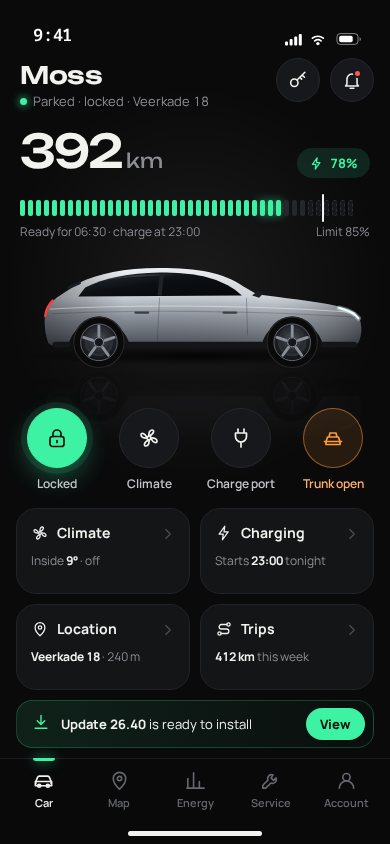
Roadster is a complete app for owning an electric car: welcome, sign in, phone key setup, a car home with range, lock and quick controls, controls with trunks, lights and tyre pressures, climate with a temperature arc and seat heaters, a live charging session, a charge schedule with off-peak prices, nearby fast chargers, the car on a map, moving it with the front camera, trips and a trip with its consumption, monthly energy, service with booking, a slot and a confirmation, phone keys and sharing a key, a software update, a Plus plan, alerts, account and settings. Asphalt black with charge green and heat amber.
| Detail | Value |
|---|---|
| Screen type | Home |
| App | Roadster: Your electric car, from your phone |
| Category | Travel |
| Design language | Dark-first, dark |
| Type | Unbounded for headings, Manrope for text |
| Colours | #0a0a0b background, #141517 surface, #f2f2ef text, #8c8e94 text-muted, #3df2a3 accent, #03140c accent-contrast, #ff9a3d secondary, #232428 border, #ff5a52 danger |
What this screen says
- Moss
- Parked · locked · Veerkade 18
- 392km
- Ready for 06:30 · charge at 23:00 Limit 85%
- Locked
- Climate
- Charge port
- Trunk open
- Inside 9° · off
- Charging
- Starts 23:00 tonight
- Location
- Veerkade 18 · 240 m
- Trips
- 412 km this week
- Update 26.40 is ready to install
- View
- Car
- Map
- Energy
- Service
- Account
Around it in Roadster
More home screens
- Convoy Home: Carpooling between cities
- Manifest Home: Trip plans from your confirmation emails
- Fairground Home: Theme park tickets, wait times and map
- Scoot Map: E-scooter and e-bike rental
- Nomad Explore: Travel eSIM data plans
- Tern Home: Ferry and island hopping
- Berth Home: Night trains and sleeper cabins
- Caravan Home: Campervan rental and road trips
- Layover Home: Airport guide, gates and lounges
- Permit Wallet: Visas and travel documents wallet
- Backroad Home: Road trip planner with stops
- Bunk Home: Hostels and backpacker meetups
What makes a good home screen
- Put the most important thing first. Decide the one thing most people come for, like today's workout, a balance or the next booking, and give it the top of the screen.
- Make it feel current. Greetings with the time of day, today's date, fresh numbers and recent activity tell people the app is alive and about them.
- Keep quick actions within thumb reach. The two or three things people do most should be one tap away, in the lower part of the screen or a floating button.
- Group related content in clear sections. Use headings and spacing so the screen scans as a few blocks, not a long mixed list.
The full home screen guide and every example
Remix Roadster free: describe your own app and it is drawn in this design. Or get its files from $10: Figma, React Native, SwiftUI, Flutter and HTML.