Templates · Home screens · Travel app · Berth
Berth Home screen
A home screen from Berth, a night trains and sleeper cabins app template in a Luxury style. Screen 3 of 25.
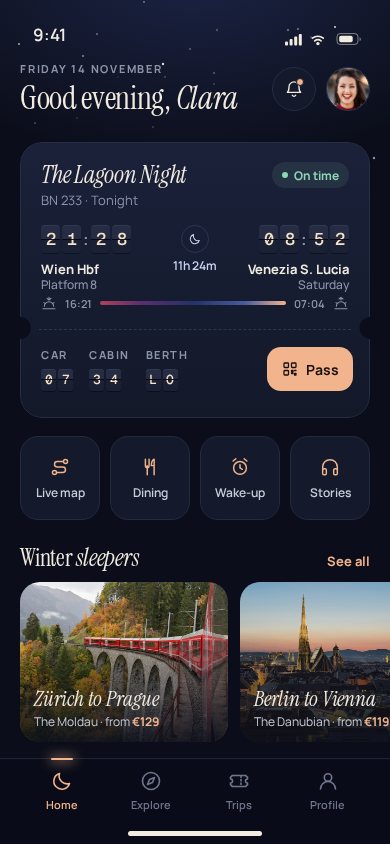
Berth is a complete sleeper train app: welcome, sign in, a home with tonight's cabin, search and departures, the journey stop by stop through the night, cabin classes and a cabin, a carriage plan to choose a berth, extras, passengers, review and pay, a booked screen, trips, a boarding pass, live tracking, the dining car, cabin service with a wake-up call, explore, night stories, a night log, notifications, the Berth Circle membership, profile and settings. Midnight navy with ivory serif type, split-flap tiles and an apricot dawn.
| Detail | Value |
|---|---|
| Screen type | Home |
| App | Berth: Night trains and sleeper cabins |
| Category | Travel |
| Design language | Luxury, dark |
| Type | Instrument Serif for headings, Manrope for text |
| Colours | #0b0e1a background, #141a2b surface, #f2ece0 text, #8e94aa text-muted, #f2b48c accent, #1a0f0a accent-contrast, #b0405a secondary, #232a40 border, #ff7a7a danger |
What this screen says
- Friday 14 November
- Good evening, Clara
- The Lagoon Night
- On time
- BN 233 · Tonight
- Wien HbfPlatform 8
- Venezia S. LuciaSaturday
- 11h 24m
- CAR
- CABIN
- BERTH
- LO
- Pass
- Live map
- Dining
- Wake-up
- Stories
- Winter sleepers
- See all
- Zürich to Prague
- The Moldau · from €129
- Berlin to Vienna
- The Danubian · from €119
- Home
- Explore
- Trips
- Profile
Around it in Berth
More home screens
- Lodge Home: Hotels, deals and reservations
- Fare Home: Flight search and price alerts
- Rove Home: Reviews and things to do
- Ignition Explore: Car rental from local hosts
- Contrail Home: Airline booking, check-in and boarding
- Keycard Home: Hotel stays, digital key and room service
- Detour Map: Community driving navigation
- Convoy Home: Carpooling between cities
- Manifest Home: Trip plans from your confirmation emails
- Roadster Car: Your electric car, from your phone
- Fairground Home: Theme park tickets, wait times and map
- Scoot Map: E-scooter and e-bike rental
What makes a good home screen
- Put the most important thing first. Decide the one thing most people come for, like today's workout, a balance or the next booking, and give it the top of the screen.
- Make it feel current. Greetings with the time of day, today's date, fresh numbers and recent activity tell people the app is alive and about them.
- Keep quick actions within thumb reach. The two or three things people do most should be one tap away, in the lower part of the screen or a floating button.
- Group related content in clear sections. Use headings and spacing so the screen scans as a few blocks, not a long mixed list.
The full home screen guide and every example
Remix Berth free: describe your own app and it is drawn in this design. Or get its files from $10: Figma, React Native, SwiftUI, Flutter and HTML.