Templates · Home screens · Travel app · Fairground
Fairground Home screen
A home screen from Fairground, a travel app template in a Playful style. Screen 3 of 25.
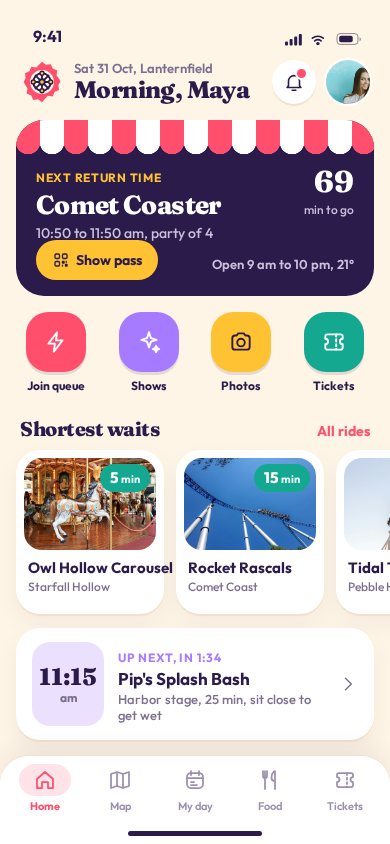
Fairground is a complete theme park app: welcome, sign in, a home with today's hours, the next return time and the shortest waits, an illustrated park map with live wait bubbles, a wait times list, ride details, a virtual queue with a return time pass, the show schedule, day tickets with a price calendar, checkout and a booked screen, ticket wallet and a scannable pass, mobile food ordering from menu to pickup, ride photos, a my day plan, a Plus upgrade, notifications, profile and settings. Popcorn cream and white with cherry, plum, lagoon teal and sunshine.
| Detail | Value |
|---|---|
| Screen type | Home |
| App | Fairground: Theme park tickets, wait times and map |
| Category | Travel |
| Design language | Playful, light |
| Type | Fraunces for headings, Outfit for text |
| Colours | #fff5e6 background, #ffffff surface, #2a1b4a text, #7a6f8f text-muted, #ff4f6d accent, #ffffff accent-contrast, #14a891 secondary, #f0e2cc border, #ff4f6d danger |
What this screen says
- Sat 31 Oct, LanternfieldMorning, Maya
- Next return timeComet Coaster
- 10:50 to 11:50 am, party of 4
- 69min to go
- Show pass
- Open 9 am to 10 pm, 21°
- Join queue
- Shows
- Photos
- Tickets
- Shortest waitsAll rides
- 5min Owl Hollow CarouselStarfall Hollow
- 15min Rocket RascalsComet Coast
- 40min Tidal TwisterPebble Harbor
- 11:15am
- Up next, in 1:34Pip's Splash Bash
- Harbor stage, 25 min, sit close to get wet
- Home
- Map
- My day
- Food
Around it in Fairground
More home screens
- Navara Home: Yacht charter
- Voya Home: Travel booking
- Wheelhouse Home: Driver app for ride hailing
- Fuelup Home: Pay at the pump and car wash
- Omnia Home: Super app for rides, food and payments
- Staya Explore: Homes and stays from local hosts
- Lodge Home: Hotels, deals and reservations
- Fare Home: Flight search and price alerts
- Rove Home: Reviews and things to do
- Ignition Explore: Car rental from local hosts
- Contrail Home: Airline booking, check-in and boarding
- Keycard Home: Hotel stays, digital key and room service
What makes a good home screen
- Put the most important thing first. Decide the one thing most people come for, like today's workout, a balance or the next booking, and give it the top of the screen.
- Make it feel current. Greetings with the time of day, today's date, fresh numbers and recent activity tell people the app is alive and about them.
- Keep quick actions within thumb reach. The two or three things people do most should be one tap away, in the lower part of the screen or a floating button.
- Group related content in clear sections. Use headings and spacing so the screen scans as a few blocks, not a long mixed list.
The full home screen guide and every example
Remix Fairground free: describe your own app and it is drawn in this design. Or get its files from $10: Figma, React Native, SwiftUI, Flutter and HTML.