Templates · Home screens · Travel app · Layover
Layover Home screen
A home screen from Layover, a travel app template in an Enterprise style. Screen 4 of 25.
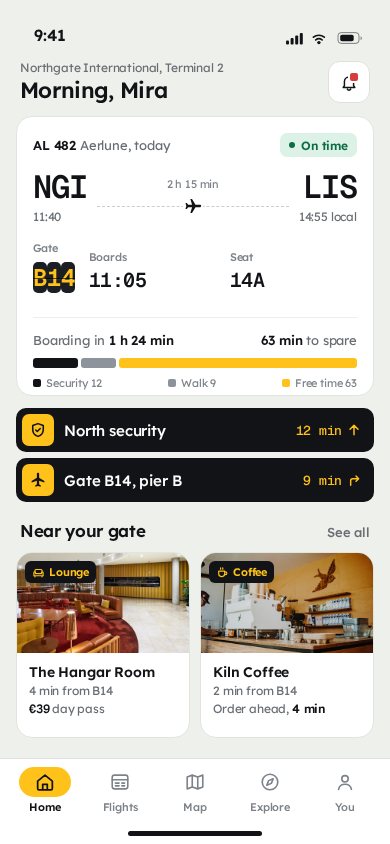
Layover is a complete airport companion: welcome, sign in, add a flight, a home with the next flight, a boarding countdown and live wayfinding signs, flight details, a boarding pass, a split flap departures board, a terminal map with a walking route, security wait times, a tight connection guide, explore and search, lounges with booking and a lounge pass, a coffee bar with order ahead and live pickup status, airport services, a year of trips in charts, alerts, a paid plan, profile and settings. Concrete grey and white with ink and signal yellow.
| Detail | Value |
|---|---|
| Screen type | Home |
| App | Layover: Airport guide, gates and lounges |
| Category | Travel |
| Design language | Enterprise, light |
| Type | Geist Mono for headings, Lexend for text |
| Colours | #eef0eb background, #ffffff surface, #111316 text, #686e74 text-muted, #ffc21a accent, #111316 accent-contrast, #12845a secondary, #dfe2dc border, #d63c3c danger |
What this screen says
- Northgate International, Terminal 2
- Morning, Mira
- AL 482 Aerlune, today On time
- NGI11:40
- 2 h 15 min
- LIS14:55 local
- Gate B14
- Boards 11:05
- Seat 14A
- Boarding in 1 h 24 min 63 min to spare
- Security 12 Walk 9 Free time 63
- North security12 min
- Gate B14, pier B9 min
- Near your gate
- See all
- Lounge
- The Hangar Room
- 4 min from B14
- €39 day pass
- Coffee
- Kiln Coffee
- 2 min from B14
- Order ahead, 4 min
- Home
- Flights
- Map
- Explore
- You
Around it in Layover
More home screens
- Hail Home: Ride hailing
- Volta Home: EV charging
- Museo Today: Museum guide
- Roamly Home: Trips, stays and experiences
- Jaunt Home: Bus, train and flight booking
- Spoke Home: Bike sharing
- Navara Home: Yacht charter
- Voya Home: Travel booking
- Wheelhouse Home: Driver app for ride hailing
- Fuelup Home: Pay at the pump and car wash
- Omnia Home: Super app for rides, food and payments
- Staya Explore: Homes and stays from local hosts
What makes a good home screen
- Put the most important thing first. Decide the one thing most people come for, like today's workout, a balance or the next booking, and give it the top of the screen.
- Make it feel current. Greetings with the time of day, today's date, fresh numbers and recent activity tell people the app is alive and about them.
- Keep quick actions within thumb reach. The two or three things people do most should be one tap away, in the lower part of the screen or a floating button.
- Group related content in clear sections. Use headings and spacing so the screen scans as a few blocks, not a long mixed list.
The full home screen guide and every example
Remix Layover free: describe your own app and it is drawn in this design. Or get its files from $10: Figma, React Native, SwiftUI, Flutter and HTML.