Templates · Home screens · Food app · Agave
Agave Tonight screen
A home screen from Agave, a cocktails and home bar app template in a Dark-first style. Screen 4 of 25.
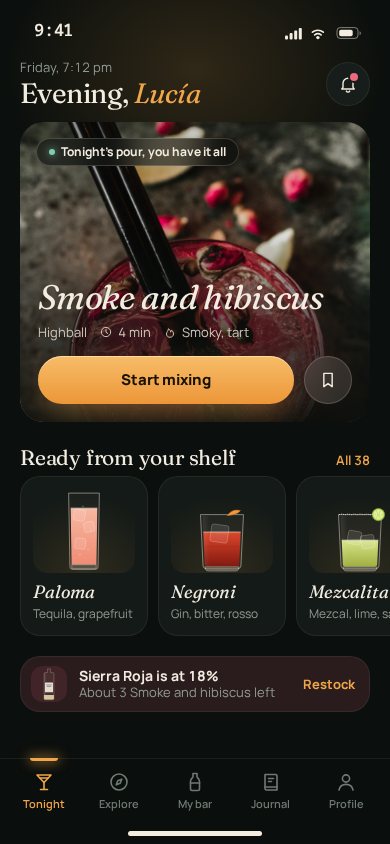
Agave is a complete home bar app: welcome, palate setup and an age checked sign up, a Tonight home that knows what you can pour, explore and collections, a recipe with a labelled pour diagram, a guided shake timer and a masterclass player, your bottle shelf with fill levels, a bottle page, label scanning, what you can make, a party batch calculator, restocking with checkout, a delivery map and confirmation, a tasting log and journal, drinking insights with mindful units, a Reserve plan, notifications, profile and settings. Near black and cream with mezcal amber, hibiscus and jade.
| Detail | Value |
|---|---|
| Screen type | Home |
| App | Agave: Cocktails and home bar |
| Category | Food |
| Design language | Dark-first, dark |
| Type | Fraunces for headings, Manrope for text |
| Colours | #0b0f0d background, #141a17 surface, #f3ece0 text, #8f9a92 text-muted, #f0a64a accent, #1a1207 accent-contrast, #ec6a7e secondary, #7fcfae success, rgba(243,236,224,0.08) border |
What this screen says
- Friday, 7:12 pm
- Evening, Lucía
- Tonight's pour, you have it all
- Smoke and hibiscus
- Highball 4 min Smoky, tart
- Start mixing
- Ready from your shelf
- All 38
- PalomaTequila, grapefruit
- NegroniGin, bitter, rosso
- MezcalitaMezcal, lime, salt
- DaiquiriRum, lime, sugar
- Sierra Roja is at 18%About 3 Smoke and hibiscus left
- Restock
- Tonight
- Explore
- My bar
- Journal
- Profile
Around it in Agave
More home screens
- Pantry Home: Grocery delivery
- Brewly Home: Coffee ordering and loyalty
- Tabla Home: Tables worth dressing for
- Corked Home: Wine journal and cellar
- Crumb Home: Neighbourhood bakery
- Tiffin Home: Food delivery
- Courier Home: Food delivery driver app
- Picker Batches: Grocery shopper app
- Queue Home: Join the waitlist from anywhere
- Nosh Home: Local restaurant reviews
- Buns Home: Burger chain ordering and deals
- Slice Home: Pizza ordering with a live tracker
What makes a good home screen
- Put the most important thing first. Decide the one thing most people come for, like today's workout, a balance or the next booking, and give it the top of the screen.
- Make it feel current. Greetings with the time of day, today's date, fresh numbers and recent activity tell people the app is alive and about them.
- Keep quick actions within thumb reach. The two or three things people do most should be one tap away, in the lower part of the screen or a floating button.
- Group related content in clear sections. Use headings and spacing so the screen scans as a few blocks, not a long mixed list.
The full home screen guide and every example
Remix Agave free: describe your own app and it is drawn in this design. Or get its files from $10: Figma, React Native, SwiftUI, Flutter and HTML.