Templates · Home screens · Food app · Ember
Ember Home screen
A home screen from Ember, a smoker and grill thermometer app template in a Dark-first style. Screen 4 of 25.
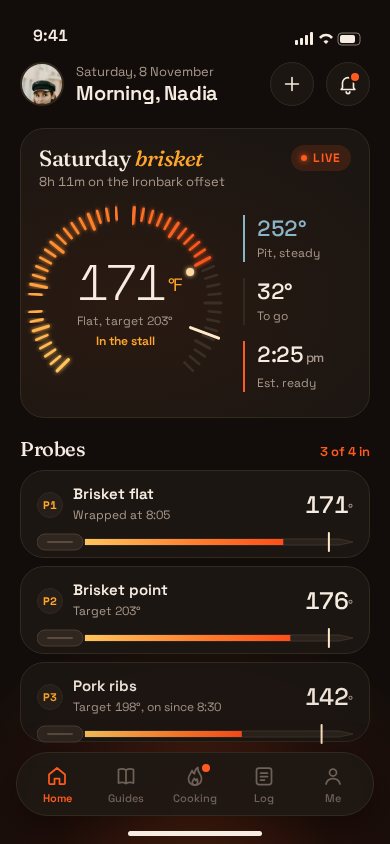
Ember is a complete wireless meat thermometer: welcome, pairing the probes, sign in, a home with the cook in progress, a live cook dial with pit and meat temperatures, a single probe with its four sensors, the cook graph with the stall and the wrap, alerts, starting a new cook, cut guides and a recipe, a rest timer, a finished cook, the cook log and a recap, pit stats, devices, a shop with checkout and an order placed, a Pro plan, notifications, profile and settings. Soot black and charcoal with an ember to amber glow.
| Detail | Value |
|---|---|
| Screen type | Home |
| App | Ember: Smoker and grill thermometer |
| Category | Food |
| Design language | Dark-first, dark |
| Type | Fraunces for headings, Space Grotesk for text |
| Colours | #120d0a background, #1c1612 surface, #f7ece1 text, #a8978a text-muted, #ff5b1f accent, #1a0b04 accent-contrast, #ffa62b secondary, #33291f border, #8ab4c8 info, #9ed27a success |
What this screen says
- Saturday, 8 November
- Morning, Nadia
- Saturday brisket
- 8h 11m on the Ironbark offset
- LIVE
- 171°F
- Flat, target 203° In the stall
- 252°Pit, steady
- 32°To go
- 2:25 pmEst. ready
- Probes
- 3 of 4 in
- P1
- Brisket flatWrapped at 8:05
- 171°
- P2
- Brisket pointTarget 203°
- 176°
- P3
- Pork ribsTarget 198°, on since 8:30
- 142°
- Home
- Guides
- Cooking
- Log
- Me
Around it in Ember
More home screens
- Dash Home: Ten minute grocery delivery
- Aisle Lists: Shared grocery lists
- Menu Table: Scan, order and pay at the table
- Mart Home: Supermarket app with loyalty and scan and go
- Rescue Discover: Surprise bags of surplus food
- Omakase Home: Chef's counter reservations
- Lunchbox Today: School lunch planner for parents
- Agave Tonight: Cocktails and home bar
- Crock Today: Fermentation and sourdough starter log
- Curbside Home: Street food and food truck finder
- Forage Home: Farmers market and veg box
- Steep Today: Tea brewing and tasting notes
What makes a good home screen
- Put the most important thing first. Decide the one thing most people come for, like today's workout, a balance or the next booking, and give it the top of the screen.
- Make it feel current. Greetings with the time of day, today's date, fresh numbers and recent activity tell people the app is alive and about them.
- Keep quick actions within thumb reach. The two or three things people do most should be one tap away, in the lower part of the screen or a floating button.
- Group related content in clear sections. Use headings and spacing so the screen scans as a few blocks, not a long mixed list.
The full home screen guide and every example
Remix Ember free: describe your own app and it is drawn in this design. Or get its files from $10: Figma, React Native, SwiftUI, Flutter and HTML.