Templates · Home screens · Productivity app · Parley
Parley Home screen
A home screen from Parley, a team messenger app template in a Dark-first style. Screen 4 of 25.
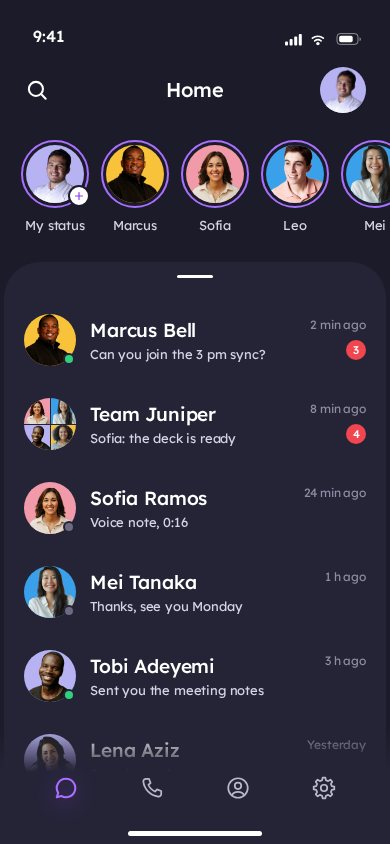
Parley is a complete team messenger: welcome, sign in and a code, a home with a status row and direct and team chats, search, statuses, a one to one chat with voice notes, a team chat with a poll and a shared task, creating a group with an admin and invited members, group info, channels, shared tasks, polls, calls, a video meeting, a weekly team pulse, contacts, profile, notifications, a plan and settings. Dark indigo charcoal with one violet and portraits on flat coloured circles.
| Detail | Value |
|---|---|
| Screen type | Home |
| App | Parley: Team messenger |
| Category | Productivity |
| Design language | Dark-first, dark |
| Type | Lexend |
| Colours | #1c1b29 background, #252437 surface, #ffffff text, #8d8ca3 text-muted, #8b3df0 accent, #ffffff accent-contrast, #f6c443 secondary, #34334a border, #f0464f danger |
What this screen says
- Home
- My status
- Marcus
- Sofia
- Leo
- Mei
- Marcus Bell
- Can you join the 3 pm sync?
- 2 min ago 3
- Team Juniper
- Sofia: the deck is ready
- 8 min ago 4
- Sofia Ramos
- Voice note, 0:16
- 24 min ago
- Mei Tanaka
- Thanks, see you Monday
- 1 h ago
- Tobi Adeyemi
- Sent you the meeting notes
- 3 h ago
- Lena Aziz
- Sounds good
- Yesterday
Around it in Parley
More home screens
- Pomo Home: Focus timer
- Postbox Inbox: Email for busy teams
- Daybook Today: Calendar and planner
- Scanly Home: Document scanner
- Keyring Vault: Password manager
- Rota Home: Shift scheduling for hourly teams
- Inkwell Today: Daily journal
- Shortlist Home: Job search and application tracker
- Docket Home: Task and sprint planner
- Kanso Home: Tasks, calendar and chat
- Margin Home: AI note taking
- Aide Home: Executive AI assistant
Every productivity app home screen
What makes a good home screen
- Put the most important thing first. Decide the one thing most people come for, like today's workout, a balance or the next booking, and give it the top of the screen.
- Make it feel current. Greetings with the time of day, today's date, fresh numbers and recent activity tell people the app is alive and about them.
- Keep quick actions within thumb reach. The two or three things people do most should be one tap away, in the lower part of the screen or a floating button.
- Group related content in clear sections. Use headings and spacing so the screen scans as a few blocks, not a long mixed list.
The full home screen guide and every example
Remix Parley free: describe your own app and it is drawn in this design. Or get its files from $10: Figma, React Native, SwiftUI, Flutter and HTML.