Templates · Search and explore screens · Productivity app · Ping
Ping Coverage map screen
A search screen from Ping, an internet speed test app template in a Dark-first style. Screen 12 of 25.
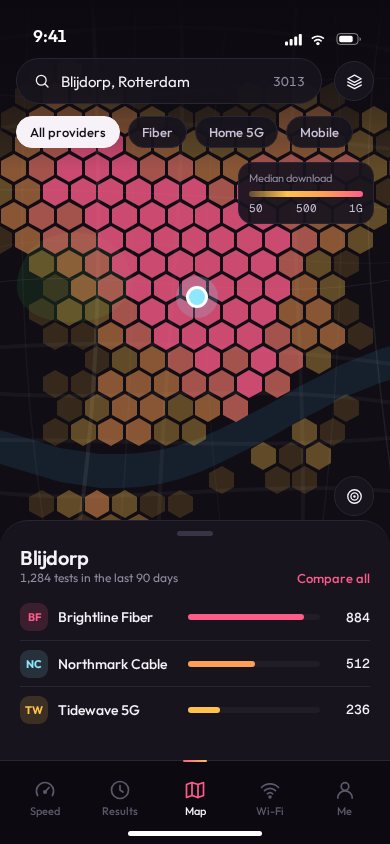
Ping is a complete internet speed test app: welcome, location permission and sign in, a home with the GO gauge, live download and upload tests, a result with plan check, test details with latency ranges, results history and 30 day insights, server picker, a hex coverage map, provider rankings and a provider page, a video streaming test and its result, a Wi-Fi channel analyzer, a room by room signal finder, nearby outages, a report to your provider, a Plus plan with checkout, alerts, profile and settings. Plum black with signal rose, sodium amber and ice.
| Detail | Value |
|---|---|
| Screen type | Search |
| App | Ping: Internet speed test |
| Category | Productivity |
| Design language | Dark-first, dark |
| Type | Outfit |
| Colours | #0c0a10 background, #17141d surface, #f6f2f8 text, #958da3 text-muted, #ff5c8a accent, #1a0a12 accent-contrast, #ffc24b secondary, #2a2533 border, #ff6b5b danger |
What this screen says
- Blijdorp, Rotterdam3013
- All providers Fiber Home 5G Mobile
- Median download
- 50 500 1G
- Blijdorp
- 1,284 tests in the last 90 days
- Compare all
- BF
- Brightline Fiber
- NC
- Northmark Cable
- TW
- Tidewave 5G
- Speed
- Results
- Map
- Wi-Fi
- Me
Around it in Ping
More search and explore screens
- Kanso Search: Tasks, calendar and chat
- Margin Search: AI note taking
- Aide Search: Executive AI assistant
- Juno Search: AI chat assistant
- Opal Search: Studio dashboard
- Jot Search: Quick notes and checklists
- Chrono Add city: World clock, timers and stopwatch
- Frontdesk Macros: Customer support inbox
- Campaign Audience: Email marketing campaigns
- Outpost Search: Schedule social posts
- Pageview Search: Website analytics
- Quill Search: Docs, wikis and databases in one workspace
Every productivity app search screen
What makes a good search screen
- Show something before people type. Recent searches, popular items or categories make the empty search screen useful and save typing.
- Suggest as people type. Autocomplete with matching items, not only matching words, lets people jump straight to a result.
- Make filters visible and reversible. Show active filters as chips that can be removed in one tap, and the number of results as filters change.
- Forgive typos. Close matches and "Did you mean" stop a spelling mistake from ending in an empty screen.
The full search screen guide and every example
Remix Ping free: describe your own app and it is drawn in this design. Or get its files from $10: Figma, React Native, SwiftUI, Flutter and HTML.