Templates · Search and explore screens · Productivity app · Staffroom
Staffroom Directory screen
A search screen from Staffroom, a productivity app template in an Enterprise style. Screen 19 of 25.
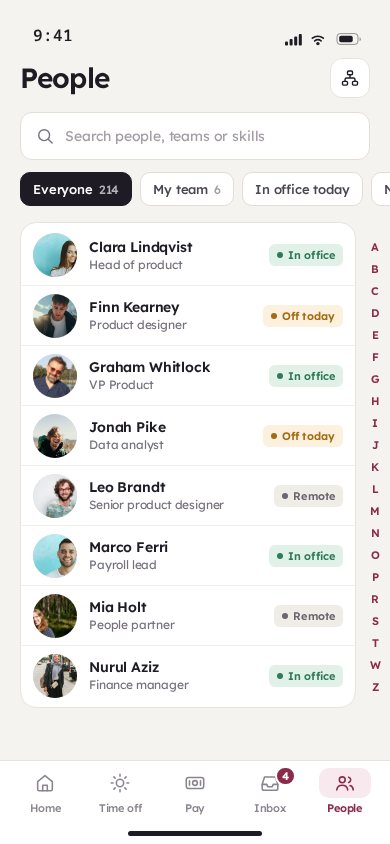
Staffroom is a complete employee HR app: welcome, workspace sign in and a 6 digit code, a home with next payday, requests waiting and the leave balance, a manager inbox with a time off approval, time off balances, a calendar request with review and confirmation, a team absence calendar, pay with a year chart, a full UK payslip, expenses with a receipt scanner and a new claim form, benefits and a health cover plan picker, a people directory, a colleague profile, an org chart, a quarterly check in, notifications, a staff badge profile and settings. Warm stone and white with deep claret and ochre.
| Detail | Value |
|---|---|
| Screen type | Search |
| App | Staffroom: HR, payslips and time off |
| Category | Productivity |
| Design language | Enterprise, light |
| Type | Lexend |
| Colours | #f5f3ef background, #ffffff surface, #1f1b24 text, #77717d text-muted, #8b2a4a accent, #ffffff accent-contrast, #c9851b secondary, #e8e3dc border, #c4422f danger |
What this screen says
- People
- Search people, teams or skills
- Everyone 214
- My team 6
- In office today
- New starters
- Clara LindqvistHead of product
- In office
- Finn KearneyProduct designer
- Off today
- Graham WhitlockVP Product
- Jonah PikeData analyst
- Leo BrandtSenior product designer
- Remote
- Marco FerriPayroll lead
- Mia HoltPeople partner
- Nurul AzizFinance manager
- Home
- Time off
- Pay
- Inbox4
Around it in Staffroom
More search and explore screens
- Slot Search: Booking links and meeting scheduling
- Sheet Filter: Spreadsheets and databases
- Tunnel Map: VPN and online privacy
- Ping Servers: Internet speed test
- Glance Results: Visual search with the camera
- Replay Search: Record and share screen videos
- Easel Search: Collaborative whiteboard
- Token Search: Two-factor codes and sign-in approvals
- Beam Search: Send big files
- Parchment Search: Documents, edit and share
- Lectern Search: Slides and presenter remote
- Ringer Search: Phone, contacts and voicemail
Every productivity app search screen
What makes a good search screen
- Show something before people type. Recent searches, popular items or categories make the empty search screen useful and save typing.
- Suggest as people type. Autocomplete with matching items, not only matching words, lets people jump straight to a result.
- Make filters visible and reversible. Show active filters as chips that can be removed in one tap, and the number of results as filters change.
- Forgive typos. Close matches and "Did you mean" stop a spelling mistake from ending in an empty screen.
The full search screen guide and every example
Remix Staffroom free: describe your own app and it is drawn in this design. Or get its files from $10: Figma, React Native, SwiftUI, Flutter and HTML.