Templates · Search and explore screens · Productivity app · Slot
Slot Search screen
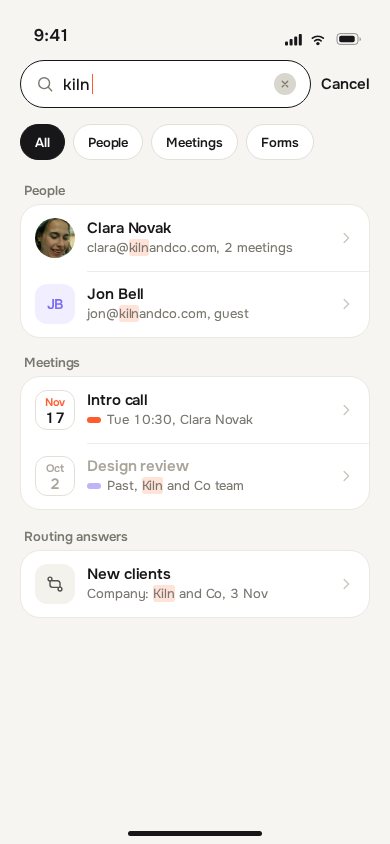
A search screen from Slot, a booking links and meeting scheduling app template in a Minimal style. Screen 21 of 25.
Slot is a complete scheduling app for people who take meetings: welcome, calendar connect, sign in, a home with today's timeline and your link, a week calendar, upcoming meetings and a meeting record, event types with an editor, weekly hours and date overrides, sharing, the invitee's booking page with day and time pickers, details and a confirmation, routing forms, reminder workflows, analytics, search, alerts, plans, account and settings. Paper and white with ink type, serif headlines and a vermilion accent.
| Detail | Value |
|---|---|
| Screen type | Search |
| App | Slot: Booking links and meeting scheduling |
| Category | Productivity |
| Design language | Minimal, light |
| Type | Instrument Serif for headings, Onest for text |
| Colours | #f6f5f1 background, #ffffff surface, #17171a text, #7a776f text-muted, #ff5b2e accent, #fff0ea accent-soft, #e8e5dd border, #7c6cf2 event-violet, #2f9e74 event-pine / success, #e9a23b event-amber, #2f7fd8 event-ocean, #e0453a danger |
What this screen says
- kiln
- Cancel
- All People Meetings Forms
- People
- Clara Novakclara@kilnandco.com, 2 meetings
- JB
- Jon Belljon@kilnandco.com, guest
- Meetings
- Nov17
- Intro callTue 10:30, Clara Novak
- Oct2
- Design reviewPast, Kiln and Co team
- Routing answers
- New clientsCompany: Kiln and Co, 3 Nov
Around it in Slot
More search and explore screens
- Jot Search: Quick notes and checklists
- Chrono Add city: World clock, timers and stopwatch
- Frontdesk Macros: Customer support inbox
- Campaign Audience: Email marketing campaigns
- Outpost Search: Schedule social posts
- Pageview Search: Website analytics
- Quill Search: Docs, wikis and databases in one workspace
- Tandem Search: Team chat, channels and huddles
- Shipyard Search: Issue tracking for product teams
- Canvas Search: Design files and comments on mobile
- Merge Search: Code, pull requests and reviews
- Query Ask: AI answers with sources
Every productivity app search screen
What makes a good search screen
- Show something before people type. Recent searches, popular items or categories make the empty search screen useful and save typing.
- Suggest as people type. Autocomplete with matching items, not only matching words, lets people jump straight to a result.
- Make filters visible and reversible. Show active filters as chips that can be removed in one tap, and the number of results as filters change.
- Forgive typos. Close matches and "Did you mean" stop a spelling mistake from ending in an empty screen.
The full search screen guide and every example
Remix Slot free: describe your own app and it is drawn in this design. Or get its files from $10: Figma, React Native, SwiftUI, Flutter and HTML.