Templates · Search and explore screens · Productivity app · Lectern
Lectern Search screen
A search screen from Lectern, a slides and presenter remote app template in a Dark-first style. Screen 4 of 25.
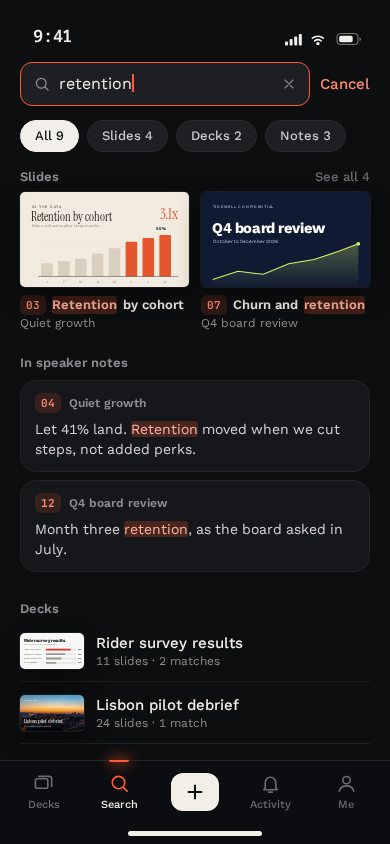
Lectern is a complete slides app: welcome, sign in, a deck gallery with the next talk, search across slides and notes, themes for a new deck, a deck page, the slide navigator, a slide editor with text format, layouts, chart data and builds, comments, rehearsal with a live timer and a report, connecting to a screen, presenter view with notes, the phone as a remote and laser, share, export and a ready file, a Pro plan, activity, profile and settings. Graphite backstage, cream paper slides and a laser vermilion.
| Detail | Value |
|---|---|
| Screen type | Search |
| App | Lectern: Slides and presenter remote |
| Category | Productivity |
| Design language | Dark-first, dark |
| Type | Instrument Serif for headings, Work Sans for text |
| Colours | #0d0e10 background, #16171a surface, #f2efe9 text, #8e8c93 text-muted, #ff5a36 accent, #ffffff accent-contrast, #f2ece0 secondary, #2a2b30 border, #ffc14d warning, #5ad1b0 success |
What this screen says
- retention
- Cancel
- All 9 Slides 4 Decks 2 Notes 3
- Slides
- See all 4
- 03 Retention by cohort
- Quiet growth
- 07 Churn and retention
- Q4 board review
- In speaker notes
- 04 Quiet growth
- Let 41% land. Retention moved when we cut steps, not added perks.
- 12 Q4 board review
- Month three retention, as the board asked in July.
- Decks
- Rider survey results
- 11 slides · 2 matches
- Lisbon pilot debrief
- 24 slides · 1 match
- Search
- Activity
- Me
Around it in Lectern
More search and explore screens
- Pageview Search: Website analytics
- Quill Search: Docs, wikis and databases in one workspace
- Tandem Search: Team chat, channels and huddles
- Shipyard Search: Issue tracking for product teams
- Canvas Search: Design files and comments on mobile
- Merge Search: Code, pull requests and reviews
- Query Ask: AI answers with sources
- Glossa Choose language: Translate text, voice and camera
- Layout Templates: Design anything from templates
- Tick Browse: To-do lists and reminders
- Beacon Search: Find your devices and people
- Staffroom Directory: HR, payslips and time off
Every productivity app search screen
What makes a good search screen
- Show something before people type. Recent searches, popular items or categories make the empty search screen useful and save typing.
- Suggest as people type. Autocomplete with matching items, not only matching words, lets people jump straight to a result.
- Make filters visible and reversible. Show active filters as chips that can be removed in one tap, and the number of results as filters change.
- Forgive typos. Close matches and "Did you mean" stop a spelling mistake from ending in an empty screen.
The full search screen guide and every example
Remix Lectern free: describe your own app and it is drawn in this design. Or get its files from $10: Figma, React Native, SwiftUI, Flutter and HTML.