Templates · Home screens · Travel app · Omnia
Omnia Home screen
A home screen from Omnia, a travel app template in a Playful style. Screen 3 of 25.
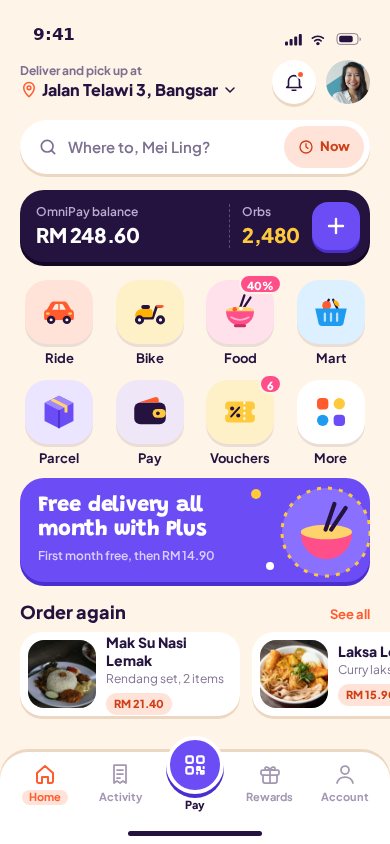
Omnia is a complete everyday super app set in Kuala Lumpur: welcome, phone sign in with an SMS code, a home with the wallet, Orbs and a grid of service tiles, where to, choosing a car or bike on a route map, a live driver arriving screen and a trip rating with tips, food browse, a restaurant, dish options, cart, live order tracking and delivered, a grocery mart, sending a parcel, the wallet with spending by service, scan to pay at a stall, pay a merchant and a receipt, rewards, vouchers, activity, a Plus membership, profile and settings. Apricot cream with persimmon, grape and sunflower.
| Detail | Value |
|---|---|
| Screen type | Home |
| App | Omnia: Super app for rides, food and payments |
| Category | Travel |
| Design language | Playful, light |
| Type | Grandstander for headings, Plus Jakarta Sans for text |
| Colours | #fff4e8 background, #ffffff surface, #24123f text, #7d6f8f text-muted, #ff5b2e accent, #ffffff accent-contrast, #6c4cf5 secondary, #f0dfcc border, #e5304f danger |
What this screen says
- Deliver and pick up at Jalan Telawi 3, Bangsar
- Where to, Mei Ling? Now
- OmniPay balanceRM 248.60
- Orbs2,480
- Ride
- Bike
- Food
- Mart
- Parcel
- Pay
- Vouchers
- More
- Free delivery all month with Plus
- First month free, then RM 14.90
- Order again
- See all
- Mak Su Nasi LemakRendang set, 2 itemsRM 21.40
- Laksa Lorong 9Curry laksa, largeRM 15.90
- Home
- Activity
- Rewards
- Account
Around it in Omnia
More home screens
- Nomad Explore: Travel eSIM data plans
- Tern Home: Ferry and island hopping
- Berth Home: Night trains and sleeper cabins
- Caravan Home: Campervan rental and road trips
- Layover Home: Airport guide, gates and lounges
- Permit Wallet: Visas and travel documents wallet
- Backroad Home: Road trip planner with stops
- Bunk Home: Hostels and backpacker meetups
- Piazza Today: Self-guided city walking tours
- Fjord Today: Cruise companion on board
- Atlas Map: Maps and navigation
- Kerb Map: Parking that reads like a road sign
What makes a good home screen
- Put the most important thing first. Decide the one thing most people come for, like today's workout, a balance or the next booking, and give it the top of the screen.
- Make it feel current. Greetings with the time of day, today's date, fresh numbers and recent activity tell people the app is alive and about them.
- Keep quick actions within thumb reach. The two or three things people do most should be one tap away, in the lower part of the screen or a floating button.
- Group related content in clear sections. Use headings and spacing so the screen scans as a few blocks, not a long mixed list.
The full home screen guide and every example
Remix Omnia free: describe your own app and it is drawn in this design. Or get its files from $10: Figma, React Native, SwiftUI, Flutter and HTML.