Templates · Sign in and sign up screens · Travel app · Omnia
Omnia Sign in screen
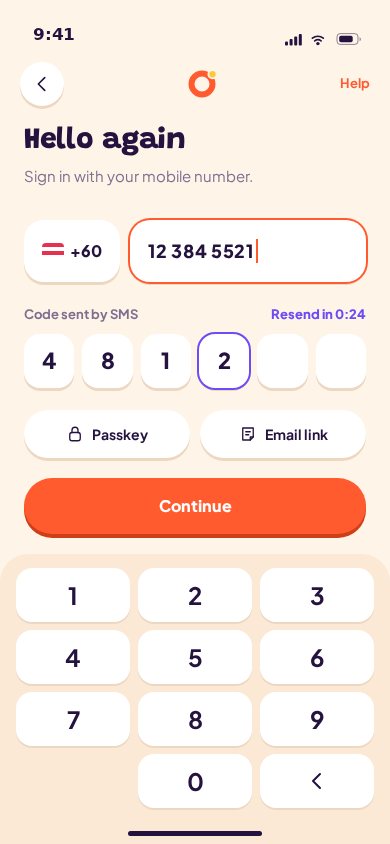
A sign in screen from Omnia, a travel app template in a Playful style. Screen 2 of 25.
Omnia is a complete everyday super app set in Kuala Lumpur: welcome, phone sign in with an SMS code, a home with the wallet, Orbs and a grid of service tiles, where to, choosing a car or bike on a route map, a live driver arriving screen and a trip rating with tips, food browse, a restaurant, dish options, cart, live order tracking and delivered, a grocery mart, sending a parcel, the wallet with spending by service, scan to pay at a stall, pay a merchant and a receipt, rewards, vouchers, activity, a Plus membership, profile and settings. Apricot cream with persimmon, grape and sunflower.
| Detail | Value |
|---|---|
| Screen type | Sign in |
| App | Omnia: Super app for rides, food and payments |
| Category | Travel |
| Design language | Playful, light |
| Type | Grandstander for headings, Plus Jakarta Sans for text |
| Colours | #fff4e8 background, #ffffff surface, #24123f text, #7d6f8f text-muted, #ff5b2e accent, #ffffff accent-contrast, #6c4cf5 secondary, #f0dfcc border, #e5304f danger |
What this screen says
- Help
- Hello again
- Sign in with your mobile number.
- Code sent by SMS Resend in 0:24
- Passkey
- Email link
- Continue
Around it in Omnia
More sign in and sign up screens
- Museo Sign in: Museum guide
- Roamly Sign in: Trips, stays and experiences
- Jaunt Sign in: Bus, train and flight booking
- Spoke Sign in: Bike sharing
- Navara Sign in: Yacht charter
- Voya Sign in: Travel booking
- Wheelhouse Sign in: Driver app for ride hailing
- Fuelup Sign in: Pay at the pump and car wash
- Staya Sign in: Homes and stays from local hosts
- Lodge Sign in: Hotels, deals and reservations
- Fare Sign in: Flight search and price alerts
- Rove Sign in: Reviews and things to do
Every travel app sign in screen
What makes a good login screen
- Offer the fastest option first. Sign in with Apple, Google or a passkey takes one tap. If you support them, put them above the email form. Apple asks apps that use a third-party login like Google to also offer an equivalent privacy-focused option, such as Sign in with Apple.
- Separate sign in from sign up clearly. Use different headings and buttons, and a clear link to switch. People who already have an account should never end up creating a second one by accident.
- Use the right keyboard and autofill. Email fields should open the email keyboard and support password managers and one-time code autofill. Small details, big difference in how many people get through.
- Write errors that help. "That password doesn't match this email" is better than "Error 401". Keep what people typed so they only fix the part that was wrong.
The full login screen guide and every example
Remix Omnia free: describe your own app and it is drawn in this design. Or get its files from $10: Figma, React Native, SwiftUI, Flutter and HTML.