Templates · Settings screens · Lifestyle app · Muse
Muse Settings screen
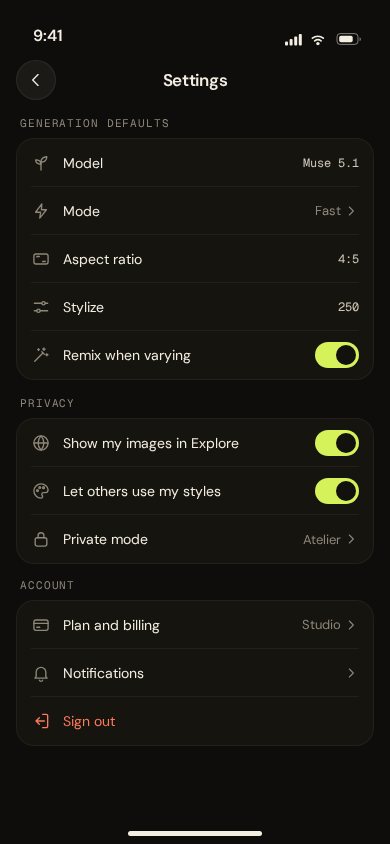
A settings screen from Muse, an AI image studio app template in a Dark-first style. Screen 25 of 25.
Muse is a complete AI image studio: welcome, a taste picker and sign in, a create feed of your jobs, a prompt composer with aspect, stylize, variety and mode, a live generating screen, the four image grid with upscale and vary, an upscaled image, region editing, an explore feed, search, a community image with its prompt, style codes and a style page, a creator profile, your archive, collections, usage of fast hours, plans with checkout and a confirmation, notifications, profile and settings. Warm ink black with ivory, chartreuse and lilac.
| Detail | Value |
|---|---|
| Screen type | Settings |
| App | Muse: AI image studio |
| Category | Lifestyle |
| Design language | Dark-first, dark |
| Type | Instrument Serif for headings, DM Sans for text |
| Colours | #0e0d0b background, #1c1a16 surface, #f3ede2 text, #8f877a text-muted, #d6f25b accent, #12110e accent-contrast, #b9a7ff secondary, #2a2722 border, #ff7a5c danger |
What this screen says
- Settings
- Generation defaults
- ModelMuse 5.1
- ModeFast
- Aspect ratio4:5
- Stylize250
- Remix when varying
- Privacy
- Show my images in Explore
- Let others use my styles
- Private modeAtelier
- Account
- Plan and billingStudio
- Notifications
- Sign out
Around it in Muse
More settings screens
- Collar Settings: GPS pet tracker
- Postage Settings: Send parcels and find drop-off points
- Specs Settings: Glasses with virtual try-on
- Circuit Settings: Electronics store with trade-in and repairs
- Provenance Settings: Authenticated luxury resale
- Gavel Settings: Live online auctions
- Tidy Settings: Book home cleaners
- Dorm Settings: Find student housing
- Hem Settings: Tailoring and alterations, collected
- Lendly Settings: Borrow things from neighbours
- Stub Settings: Fan to fan ticket resale
- Trove Settings: Visual ideas and boards
Every lifestyle app settings screen
What makes a good settings screen
- Group options into clear sections. Account, notifications, privacy, appearance and help, with headings, so people scan to the right group.
- Label settings by their effect. "Daily reminder at 8:00" is clearer than "Reminders". Add a short description under options that need one.
- Use the right control. Toggles for on and off, a row that opens a list for choices, and sliders only for ranges.
- Apply changes immediately. Most mobile settings take effect when changed, with no Save button to forget.
The full settings screen guide and every example
Remix Muse free: describe your own app and it is drawn in this design. Or get its files from $10: Figma, React Native, SwiftUI, Flutter and HTML.