Templates · Home screens · Smart home app · Latch
Latch Home screen
A home screen from Latch, a smart locks and guest access app template in a Minimal style. Screen 4 of 25.
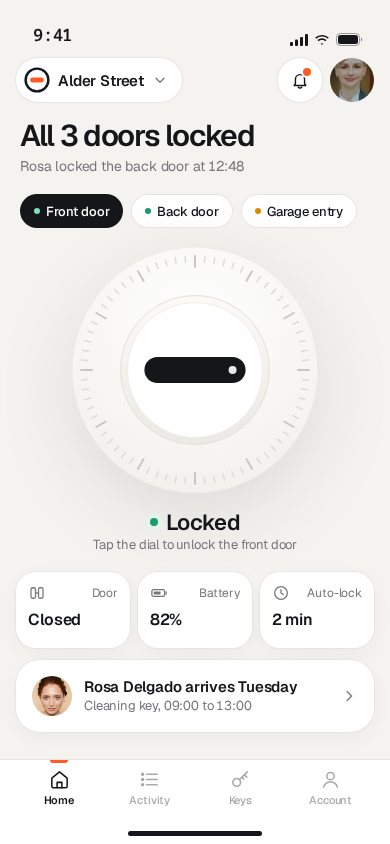
Latch is a complete smart lock app: welcome, sign in, a home with a big lock dial, door details, a live auto-lock countdown, every door across two homes, a door activity log with entry details, guest keys with schedules, an access window picker, review and a sent key, keypad codes with a number pad, auto-lock and auto-unlock, lock health insights, adding and calibrating a lock, a plan, notifications, account and settings. Porcelain and white with ink, one vermilion for unlocked and a calm green for locked.
| Detail | Value |
|---|---|
| Screen type | Home |
| App | Latch: Smart locks and guest access |
| Category | Smart home |
| Design language | Minimal, light |
| Type | Geist Mono for headings, Geist for text |
| Colours | #f4f3ef background, #ffffff surface, #141619 text, #76777b text-muted, #ff5a28 accent, #ffebe3 accent-soft, #1d9a66 success, #d98a00 warning, #e7e5df border |
What this screen says
- Alder Street
- All 3 doors locked
- Rosa locked the back door at 12:48
- Front door Back door Garage entry
- Locked
- Tap the dial to unlock the front door
- Door
- Closed
- Battery
- Auto-lock
- 2 min
- Rosa Delgado arrives Tuesday
- Cleaning key, 09:00 to 13:00
- Home
- Activity
- Keys
- Account
Around it in Latch
More home screens
- Kelvin Home: Climate and thermostat
- Glow Home: Light scenes and colour
- Tagged Home: Home inventory for insurance
- Lobby Home: Apartment building app
- Sweep Home: Robot vacuum and mop
- Dusk Home: Smart home scenarios
- Lumen Home: Smart home energy
- Abode Home: Smart home devices
- Boxed Home: Book movers and plan moving day
- Meter Home: Your energy supplier account
- Couch For you: TV remote, casting and watchlist
- Chime Home: Voice assistant and smart speaker
Every smart home app home screen
What makes a good home screen
- Put the most important thing first. Decide the one thing most people come for, like today's workout, a balance or the next booking, and give it the top of the screen.
- Make it feel current. Greetings with the time of day, today's date, fresh numbers and recent activity tell people the app is alive and about them.
- Keep quick actions within thumb reach. The two or three things people do most should be one tap away, in the lower part of the screen or a floating button.
- Group related content in clear sections. Use headings and spacing so the screen scans as a few blocks, not a long mixed list.
The full home screen guide and every example
Remix Latch free: describe your own app and it is drawn in this design. Or get its files from $10: Figma, React Native, SwiftUI, Flutter and HTML.