Templates · Home screens · Smart home app · Boxed
Boxed Home screen
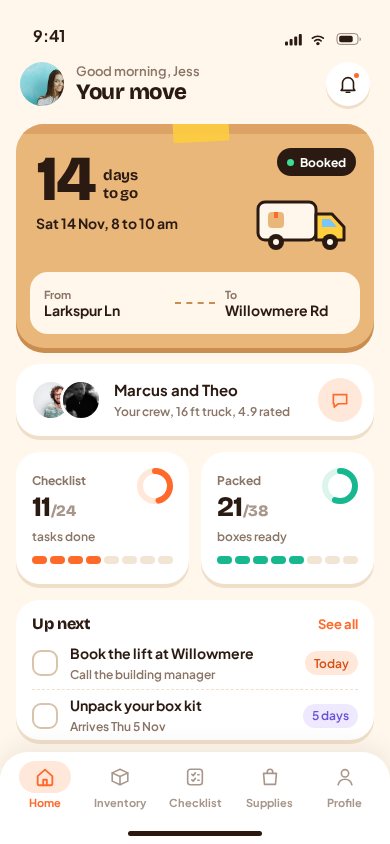
A home screen from Boxed, a smart home app template in a Playful style. Screen 3 of 25.
Boxed is a complete moving app: welcome, sign in with a texted code, a home with the move day countdown, crew and checklist, move details with both addresses, an inventory by room with a truck fill meter, a room with item steppers and box counts, add item, pick a van, pick a crew, a mover profile, a fixed price quote, a calendar with daily prices, review and pay, a booked ticket, a countdown checklist, packing progress, live move tracking on a map, chat with the crew, a supplies shop and box kit, rate and tip the crew, a Plus cover plan, notifications, profile and settings. Cream and kraft with tomato orange, sunny yellow and mint.
| Detail | Value |
|---|---|
| Screen type | Home |
| App | Boxed: Book movers and plan moving day |
| Category | Smart home |
| Design language | Playful, light |
| Type | Bricolage Grotesque for headings, Plus Jakarta Sans for text |
| Colours | #fff7ec background, #ffffff surface, #2b1a12 text, #8a7566 text-muted, #ff6a2b accent, #ffffff accent-contrast, #e9b77a secondary, #f0dfc8 border, #e0452a danger |
What this screen says
- Good morning, JessYour move
- 14days
- to go
- Sat 14 Nov, 8 to 10 am
- Booked
- FromLarkspur Ln
- ToWillowmere Rd
- Marcus and TheoYour crew, 16 ft truck, 4.9 rated
- Checklist11/24
- tasks done
- Packed21/38
- boxes ready
- Up nextSee all
- Book the lift at WillowmereCall the building manager
- Today
- Unpack your box kitArrives Thu 5 Nov
- 5 days
- Home
- Inventory
- Checklist
- Supplies
- Profile
Around it in Boxed
More home screens
- Chime Home: Voice assistant and smart speaker
- Latch Home: Smart locks and guest access
- Mesh Home: Home Wi-Fi network
- Decibel Rooms: Multi-room speakers
- Nursery Home: Baby monitor camera and sleep
- Porch Home: Home security cameras
- Sundial Today: Solar panels and home battery
- Puddle Garden: Garden watering and sprinklers
- Upkeep Today: Home maintenance calendar
- Kelvin Home: Climate and thermostat
- Glow Home: Light scenes and colour
- Tagged Home: Home inventory for insurance
Every smart home app home screen
What makes a good home screen
- Put the most important thing first. Decide the one thing most people come for, like today's workout, a balance or the next booking, and give it the top of the screen.
- Make it feel current. Greetings with the time of day, today's date, fresh numbers and recent activity tell people the app is alive and about them.
- Keep quick actions within thumb reach. The two or three things people do most should be one tap away, in the lower part of the screen or a floating button.
- Group related content in clear sections. Use headings and spacing so the screen scans as a few blocks, not a long mixed list.
The full home screen guide and every example
Remix Boxed free: describe your own app and it is drawn in this design. Or get its files from $10: Figma, React Native, SwiftUI, Flutter and HTML.