Templates · Home screens · Smart home app · Sweep
Sweep Home screen
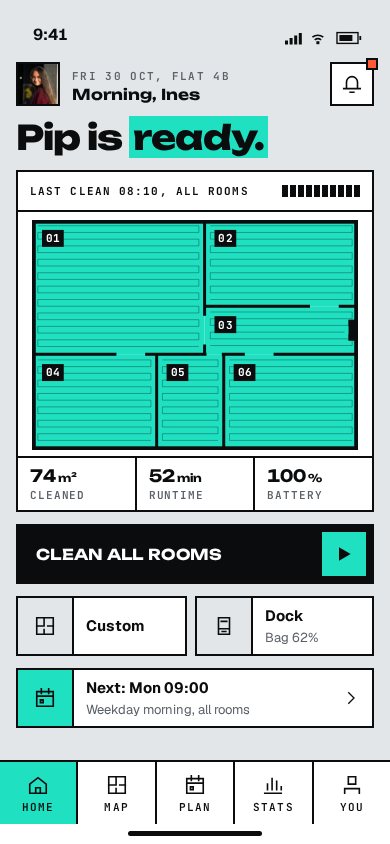
A home screen from Sweep, a robot vacuum and mop app template in a Brutalist style. Screen 5 of 25.
Sweep is a complete robot vacuum and mop app: welcome, pairing, sign in and first mapping, a home with the last clean on the floor plan, a live clean with the path filling in room by room, rooms, room settings, map editing with no-go zones and virtual walls, a custom clean, schedules, a clean report with dirt hotspots, history, stats, a live robot camera, avoided obstacles, the self-emptying dock, consumables care with a reorder cart, notifications, a Plus plan, profile and settings. Concrete grey, black and electric aqua.
| Detail | Value |
|---|---|
| Screen type | Home |
| App | Sweep: Robot vacuum and mop |
| Category | Smart home |
| Design language | Brutalist, light |
| Type | Unbounded for headings, Geist for text |
| Colours | #e3e6e8 background, #ffffff surface, #0b0c0d text, #5b6168 text-muted, #1fe0c0 accent, #0b0c0d accent-contrast, #c9ced2 secondary, #0b0c0d border, #ff5a36 danger |
What this screen says
- Fri 30 Oct, Flat 4B Morning, Ines
- Pip is ready.
- LAST CLEAN 08:10, ALL ROOMS
- 74m²
- CLEANED
- 52min
- RUNTIME
- BATTERY
- Clean all rooms
- Custom
- DockBag 62%
- Next: Mon 09:00Weekday morning, all rooms
- Home
- Map
- Plan
- Stats
- You
Around it in Sweep
More home screens
- Boxed Home: Book movers and plan moving day
- Meter Home: Your energy supplier account
- Couch For you: TV remote, casting and watchlist
- Chime Home: Voice assistant and smart speaker
- Latch Home: Smart locks and guest access
- Mesh Home: Home Wi-Fi network
- Decibel Rooms: Multi-room speakers
- Nursery Home: Baby monitor camera and sleep
- Porch Home: Home security cameras
- Sundial Today: Solar panels and home battery
- Puddle Garden: Garden watering and sprinklers
- Upkeep Today: Home maintenance calendar
Every smart home app home screen
What makes a good home screen
- Put the most important thing first. Decide the one thing most people come for, like today's workout, a balance or the next booking, and give it the top of the screen.
- Make it feel current. Greetings with the time of day, today's date, fresh numbers and recent activity tell people the app is alive and about them.
- Keep quick actions within thumb reach. The two or three things people do most should be one tap away, in the lower part of the screen or a floating button.
- Group related content in clear sections. Use headings and spacing so the screen scans as a few blocks, not a long mixed list.
The full home screen guide and every example
Remix Sweep free: describe your own app and it is drawn in this design. Or get its files from $10: Figma, React Native, SwiftUI, Flutter and HTML.