Templates · Home screens · Smart home app · Kelvin
Kelvin Home screen
A home screen from Kelvin, a climate and thermostat app template in a Luxury style. Screen 4 of 25.
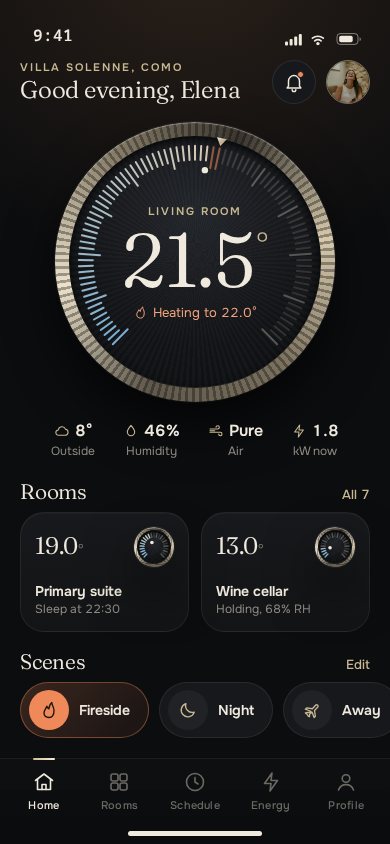
Kelvin is a complete luxury climate app: welcome, pairing a dial, sign in, a home with the living room dial, rooms, a room control with heat, cool and auto, the wine cellar, scenes, a weekday schedule and period editor, the forecast plan, live arrival preheating, away mode, air quality, history, energy, devices, the heat pump, a service booking with confirmation, alerts, a Reserve membership, profile and settings. Obsidian and ivory with champagne metal and a glacier to ember temperature scale.
| Detail | Value |
|---|---|
| Screen type | Home |
| App | Kelvin: Climate and thermostat |
| Category | Smart home |
| Design language | Luxury, dark |
| Type | Fraunces for headings, Onest for text |
| Colours | #0c0d0f background, #16181b surface, #efe9de text, #8f8b83 text-muted, #d8cbab accent, #17140f accent-contrast, #f0895a secondary, #26282c border, #e5675c danger |
What this screen says
- Villa Solenne, Como
- Good evening, Elena
- Living room
- 21.5°
- Heating to 22.0°
- 8°Outside
- 46%Humidity
- PureAir
- 1.8kW now
- Rooms
- All 7
- 19.0°
- Primary suiteSleep at 22:30
- 13.0°
- Wine cellarHolding, 68% RH
- Scenes
- Edit
- Fireside
- Night
- Away
- Home
- Schedule
- Energy
- Profile
Around it in Kelvin
More home screens
- Upkeep Today: Home maintenance calendar
- Glow Home: Light scenes and colour
- Tagged Home: Home inventory for insurance
- Lobby Home: Apartment building app
- Sweep Home: Robot vacuum and mop
- Dusk Home: Smart home scenarios
- Lumen Home: Smart home energy
- Abode Home: Smart home devices
- Boxed Home: Book movers and plan moving day
- Meter Home: Your energy supplier account
- Couch For you: TV remote, casting and watchlist
- Chime Home: Voice assistant and smart speaker
Every smart home app home screen
What makes a good home screen
- Put the most important thing first. Decide the one thing most people come for, like today's workout, a balance or the next booking, and give it the top of the screen.
- Make it feel current. Greetings with the time of day, today's date, fresh numbers and recent activity tell people the app is alive and about them.
- Keep quick actions within thumb reach. The two or three things people do most should be one tap away, in the lower part of the screen or a floating button.
- Group related content in clear sections. Use headings and spacing so the screen scans as a few blocks, not a long mixed list.
The full home screen guide and every example
Remix Kelvin free: describe your own app and it is drawn in this design. Or get its files from $10: Figma, React Native, SwiftUI, Flutter and HTML.