Templates · Home screens · Smart home app · Chime
Chime Home screen
A home screen from Chime, a voice assistant and smart speaker app template in a Glass style. Screen 4 of 25.
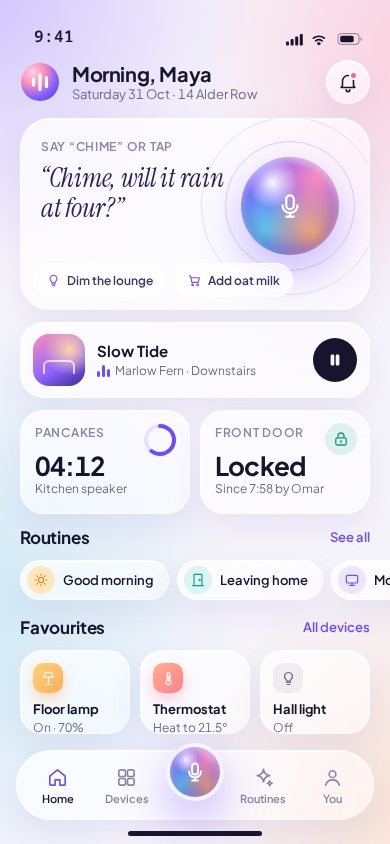
Chime is a complete voice assistant and smart speaker app: welcome, sign in and speaker setup, a home with the listening orb, now playing, a running timer and favourite devices, a live listening screen with transcript, an answer thread with a weather card and reminder, devices grouped by room, a living room with scenes and a thermostat dial, a light with a brightness capsule, routines with a builder and a success screen, timers and alarms, a shared shopping list, drop in, announcements, music on a speaker group, a skills directory, voice history with privacy controls, weekly activity, a Plus plan, notifications, a household profile and settings. Pearly lilac glass with an iridescent violet orb.
| Detail | Value |
|---|---|
| Screen type | Home |
| App | Chime: Voice assistant and smart speaker |
| Category | Smart home |
| Design language | Glass, light |
| Type | Instrument Serif for headings, Plus Jakarta Sans for text |
| Colours | #f6f4fb background, #ffffff surface, #17142e text, #6d6889 text-muted, #6c4cff accent, #ffffff accent-contrast, #ff8fb8 secondary, #e6e2f2 border, #f0466e danger |
What this screen says
- Morning, Maya
- Saturday 31 Oct · 14 Alder Row
- Say “Chime” or tap
- “Chime, will it rain at four?”
- Dim the lounge Add oat milk
- Slow Tide
- Marlow Fern · Downstairs
- Pancakes
- Kitchen speaker
- Front door
- Locked
- Since 7:58 by Omar
- Routines
- See all
- Good morning
- Leaving home
- Movie night
- Favourites
- All devices
- Floor lamp
- On · 70%
- Thermostat
- Heat to 21.5°
- Hall light
- Off
- Home
- Devices
- You
Around it in Chime
More home screens
- Latch Home: Smart locks and guest access
- Mesh Home: Home Wi-Fi network
- Decibel Rooms: Multi-room speakers
- Nursery Home: Baby monitor camera and sleep
- Porch Home: Home security cameras
- Sundial Today: Solar panels and home battery
- Puddle Garden: Garden watering and sprinklers
- Upkeep Today: Home maintenance calendar
- Kelvin Home: Climate and thermostat
- Glow Home: Light scenes and colour
- Tagged Home: Home inventory for insurance
- Lobby Home: Apartment building app
Every smart home app home screen
What makes a good home screen
- Put the most important thing first. Decide the one thing most people come for, like today's workout, a balance or the next booking, and give it the top of the screen.
- Make it feel current. Greetings with the time of day, today's date, fresh numbers and recent activity tell people the app is alive and about them.
- Keep quick actions within thumb reach. The two or three things people do most should be one tap away, in the lower part of the screen or a floating button.
- Group related content in clear sections. Use headings and spacing so the screen scans as a few blocks, not a long mixed list.
The full home screen guide and every example
Remix Chime free: describe your own app and it is drawn in this design. Or get its files from $10: Figma, React Native, SwiftUI, Flutter and HTML.