Templates · Home screens · Smart home app · Dusk
Dusk Home screen
A home screen from Dusk, a smart home scenarios app template in a Glass style. Screen 5 of 25.
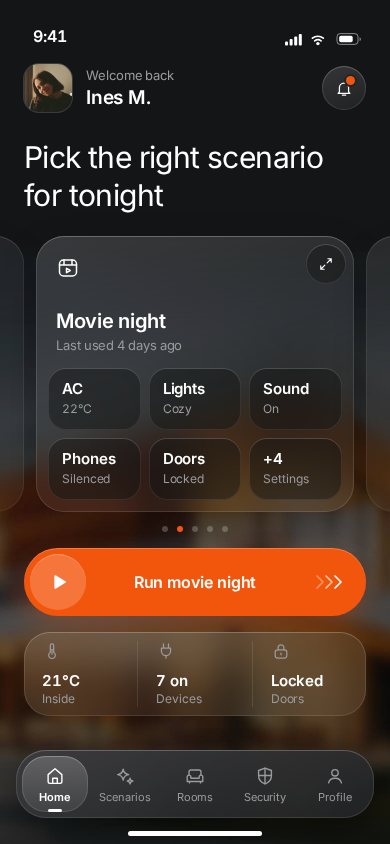
Dusk is a complete smart home app where scenarios do the work: night mode, movie night and away set rooms, devices, climate and security together in one tap. It covers onboarding, sign in, a home with a scenario carousel, a scenario builder, rooms, lights, climate, pairing a device, security and cameras, schedules, energy, a Plus plan, household, profile and settings.
| Detail | Value |
|---|---|
| Screen type | Home |
| App | Dusk: Smart home scenarios |
| Category | Smart home |
| Design language | Glass, dark |
| Type | Inter |
| Colours | #141516 background, #26272a surface, #ffffff text, #9a9b9e text-muted, #f2560d accent, #ffffff accent-contrast, #3ad07c secondary, #3a3b3e border, #ff5a4f danger |
What this screen says
- Welcome back
- Ines M.
- Pick the right scenario for tonight
- Movie night
- Last used 4 days ago
- AC
- 22°C
- Lights
- Cozy
- Sound
- On
- Phones
- Silenced
- Doors
- Locked
- Settings
- Run movie night
- 21°C
- Inside
- 7 on
- Devices
- Home
- Scenarios
- Rooms
- Security
- Profile
Around it in Dusk
More home screens
- Sundial Today: Solar panels and home battery
- Puddle Garden: Garden watering and sprinklers
- Upkeep Today: Home maintenance calendar
- Kelvin Home: Climate and thermostat
- Glow Home: Light scenes and colour
- Tagged Home: Home inventory for insurance
- Lobby Home: Apartment building app
- Sweep Home: Robot vacuum and mop
- Lumen Home: Smart home energy
- Abode Home: Smart home devices
- Boxed Home: Book movers and plan moving day
- Meter Home: Your energy supplier account
Every smart home app home screen
What makes a good home screen
- Put the most important thing first. Decide the one thing most people come for, like today's workout, a balance or the next booking, and give it the top of the screen.
- Make it feel current. Greetings with the time of day, today's date, fresh numbers and recent activity tell people the app is alive and about them.
- Keep quick actions within thumb reach. The two or three things people do most should be one tap away, in the lower part of the screen or a floating button.
- Group related content in clear sections. Use headings and spacing so the screen scans as a few blocks, not a long mixed list.
The full home screen guide and every example
Remix Dusk free: describe your own app and it is drawn in this design. Or get its files from $10: Figma, React Native, SwiftUI, Flutter and HTML.