Templates · Settings screens · Lifestyle app · Kino
Kino Parental controls screen
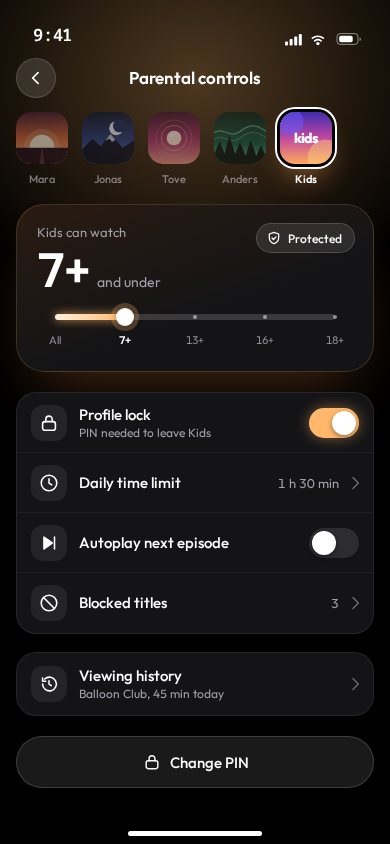
A settings screen from Kino, a film and series streaming app template in a Dark-first style. Screen 24 of 25.
Kino is a complete streaming app: welcome, sign in, profiles, a home with a tall hero poster, continue watching and a top ten, title pages with episodes, a portrait player with audio and subtitles, search, genres, new and upcoming, downloads, my list, a vertical trailer feed, watch party, ratings, a kids profile, plans, payment, devices, parental controls, account and settings. True black with cinematic photography, white type and a sparing amber glow.
| Detail | Value |
|---|---|
| Screen type | Settings |
| App | Kino: Film and series streaming |
| Category | Lifestyle |
| Design language | Dark-first, dark |
| Type | Outfit |
| Colours | #000000 background, #141416 surface, #ffffff text, #a1a1aa text-muted, #ffb86b accent, #1a1206 accent-contrast, #f5efe6 secondary, #26262b border, #ff6b5e danger |
What this screen says
- Parental controls
- Mara
- Jonas
- Tove
- Anders
- kids
- Kids can watch
- 7+and under
- Protected
- All 7+ 13+ 16+ 18+
- Profile lockPIN needed to leave Kids
- Daily time limit
- 1 h 30 min
- Autoplay next episode
- Blocked titles
- Viewing historyBalloon Club, 45 min today
- Change PIN
Around it in Kino
More settings screens
- Splice Settings: Video editor for short clips
- Blush Settings: Beauty and makeup shopping
- Flatpack Settings: Furniture store with room previews
- Column Settings: Newsletters and independent writers
- Fetch Settings: Dog walkers and pet sitters
- Forecourt Settings: Buy and sell used cars
- Tower Line: Mobile plan, data and bills
- Haul Settings: Bargain fashion and finds
- Muse Settings: AI image studio
- Admit Settings: Events and tickets near you
- Arcade Settings: Game store, library and friends
- Natal Settings: Birth charts and daily astrology
Every lifestyle app settings screen
What makes a good settings screen
- Group options into clear sections. Account, notifications, privacy, appearance and help, with headings, so people scan to the right group.
- Label settings by their effect. "Daily reminder at 8:00" is clearer than "Reminders". Add a short description under options that need one.
- Use the right control. Toggles for on and off, a row that opens a list for choices, and sliders only for ranges.
- Apply changes immediately. Most mobile settings take effect when changed, with no Save button to forget.
The full settings screen guide and every example
Remix Kino free: describe your own app and it is drawn in this design. Or get its files from $10: Figma, React Native, SwiftUI, Flutter and HTML.