Templates · Settings screens · Lifestyle app · Admit
Admit Settings screen
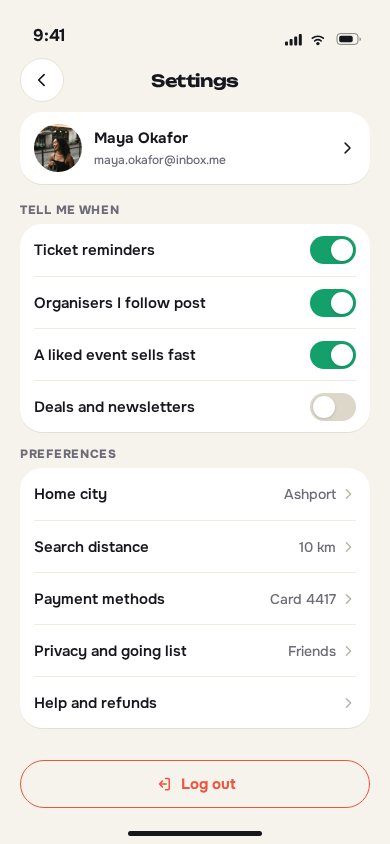
A settings screen from Admit, an events and tickets near you app template in a Playful style. Screen 21 of 25.
Admit is a complete local events app: welcome, interests and sign in, a discover home, search with categories, a weekend list by date, a map of what is on, event pages with the organiser, ticket tiers, checkout and a booked screen, a ticket wallet with QR codes and transfers, likes, followed organisers, notifications, a Plus plan, profile and settings, and a host mode with sales, a create event form, a guest list and a check in scanner. Oat and white with jade, sunflower and bubblegum.
| Detail | Value |
|---|---|
| Screen type | Settings |
| App | Admit: Events and tickets near you |
| Category | Lifestyle |
| Design language | Playful, light |
| Type | Unbounded for headings, Onest for text |
| Colours | #f6f3ec background, #ffffff surface, #16161d text, #6e6b78 text-muted, #14a06a accent, #ffffff accent-contrast, #ffd84a secondary, #ff8fb8 tertiary, #e8e3d8 border, #f0533e danger |
What this screen says
- Settings
- Maya Okaformaya.okafor@inbox.me
- TELL ME WHEN
- Ticket reminders
- Organisers I follow post
- A liked event sells fast
- Deals and newsletters
- PREFERENCES
- Home cityAshport
- Search distance10 km
- Payment methodsCard 4417
- Privacy and going listFriends
- Help and refunds
- Log out
Around it in Admit
More settings screens
- Gloss Settings: Salon and spa booking
- Vow Settings: Wedding planner
- Drizzle Settings: Weather with living skies
- Byline Settings: Daily news reader
- Shelf Settings: Reading tracker and book club
- Marquee Settings: Cinema tickets and watchlist
- Handy Settings: Home services
- Tasker Settings: Book and do local odd jobs
- Toolbox Settings: Hardware store and project lists
- Brief Settings: News in sixty words
- Kibble Settings: Pet supplies and autoship
- Filmlog Settings: Film diary and reviews
Every lifestyle app settings screen
What makes a good settings screen
- Group options into clear sections. Account, notifications, privacy, appearance and help, with headings, so people scan to the right group.
- Label settings by their effect. "Daily reminder at 8:00" is clearer than "Reminders". Add a short description under options that need one.
- Use the right control. Toggles for on and off, a row that opens a list for choices, and sliders only for ranges.
- Apply changes immediately. Most mobile settings take effect when changed, with no Save button to forget.
The full settings screen guide and every example
Remix Admit free: describe your own app and it is drawn in this design. Or get its files from $10: Figma, React Native, SwiftUI, Flutter and HTML.