Templates · Settings screens · Lifestyle app · Flatpack
Flatpack Settings screen
A settings screen from Flatpack, a furniture store with room previews app template in a Minimal style. Screen 25 of 25.
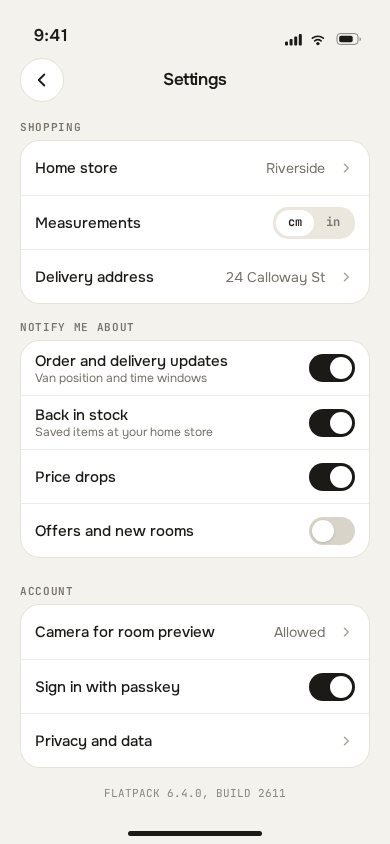
Flatpack is a complete furniture store app: welcome, home store and sign in, a home feed of rooms, a shoppable room with hotspots, search, results with filters, a product page with colours, a measured drawing, a camera room preview, in-store stock with aisle and bin, a store map with a walking route, a shopping list sorted by aisle, cart, delivery slots, assembly booking, payment, confirmation, live delivery tracking, a room planner, rewards, a membership plan, notifications, profile and settings. Warm paper and white with graphite ink and a tomato red for measurements.
| Detail | Value |
|---|---|
| Screen type | Settings |
| App | Flatpack: Furniture store with room previews |
| Category | Lifestyle |
| Design language | Minimal, light |
| Type | JetBrains Mono for headings, Onest for text |
| Colours | #f4f2ed background, #ffffff surface, #ebe7df surface-alt, #1b1a17 text, #77736a text-muted, #e2492d accent, #2f7a4b success, #b7791f warning, #e6e2d9 border |
What this screen says
- Settings
- SHOPPING
- Home store
- Riverside
- Measurements
- cmin
- Delivery address
- 24 Calloway St
- NOTIFY ME ABOUT
- Order and delivery updates
- Van position and time windows
- Back in stock
- Saved items at your home store
- Price drops
- Offers and new rooms
- ACCOUNT
- Camera for room preview
- Allowed
- Sign in with passkey
- Privacy and data
- FLATPACK 6.4.0, BUILD 2611
Around it in Flatpack
More settings screens
- Hem Settings: Tailoring and alterations, collected
- Lendly Settings: Borrow things from neighbours
- Stub Settings: Fan to fan ticket resale
- Trove Settings: Visual ideas and boards
- Vidi Settings: Video platform for creators
- Roll Settings: Photo library and backups
- Splice Settings: Video editor for short clips
- Blush Settings: Beauty and makeup shopping
- Column Settings: Newsletters and independent writers
- Fetch Settings: Dog walkers and pet sitters
- Forecourt Settings: Buy and sell used cars
- Tower Line: Mobile plan, data and bills
Every lifestyle app settings screen
What makes a good settings screen
- Group options into clear sections. Account, notifications, privacy, appearance and help, with headings, so people scan to the right group.
- Label settings by their effect. "Daily reminder at 8:00" is clearer than "Reminders". Add a short description under options that need one.
- Use the right control. Toggles for on and off, a row that opens a list for choices, and sliders only for ranges.
- Apply changes immediately. Most mobile settings take effect when changed, with no Save button to forget.
The full settings screen guide and every example
Remix Flatpack free: describe your own app and it is drawn in this design. Or get its files from $10: Figma, React Native, SwiftUI, Flutter and HTML.