Templates · Settings screens · Lifestyle app · Haul
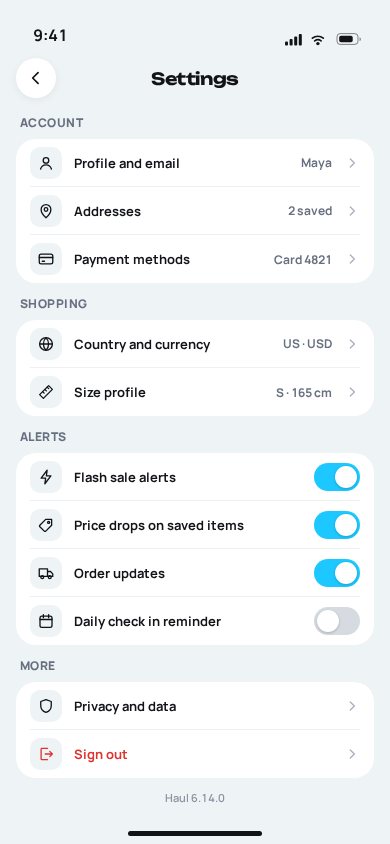
Haul Settings screen
A settings screen from Haul, a bargain fashion and finds app template in a Gen Z style. Screen 25 of 25.
Haul is a complete deal shopping app: welcome, a style picker, sign up with a first order coupon, an endless picked for you feed, flash sales by time slot, categories, search results, a product page with a size guide and photo reviews, a cart with a bundle discount meter, coupons, checkout, order placed, orders, live parcel tracking, returns, rewards with a daily check in and a prize wheel, a wishlist, writing a photo review, a Club membership, notifications, profile and settings. Icy gray and white with pool cyan, tag yellow and flash red.
| Detail | Value |
|---|---|
| Screen type | Settings |
| App | Haul: Bargain fashion and finds |
| Category | Lifestyle |
| Design language | Gen Z, light |
| Type | Unbounded for headings, Manrope for text |
| Colours | #eef3f6 background, #ffffff surface, #111317 text, #687080 text-muted, #1cc8ff accent, #111317 accent-contrast, #ffe14d secondary, #ff3b3b danger, #e2e8ed border |
What this screen says
- Settings
- ACCOUNT
- Profile and email Maya
- Addresses 2 saved
- Payment methods Card 4821
- SHOPPING
- Country and currency US · USD
- Size profile S · 165 cm
- ALERTS
- Flash sale alerts
- Price drops on saved items
- Order updates
- Daily check in reminder
- MORE
- Privacy and data
- Sign out
- Haul 6.14.0
Around it in Haul
More settings screens
- Tasker Settings: Book and do local odd jobs
- Toolbox Settings: Hardware store and project lists
- Brief Settings: News in sixty words
- Kibble Settings: Pet supplies and autoship
- Filmlog Settings: Film diary and reviews
- Guardrail Content filters: Parental controls and screen time
- Collar Settings: GPS pet tracker
- Postage Settings: Send parcels and find drop-off points
- Specs Settings: Glasses with virtual try-on
- Circuit Settings: Electronics store with trade-in and repairs
- Provenance Settings: Authenticated luxury resale
- Gavel Settings: Live online auctions
Every lifestyle app settings screen
What makes a good settings screen
- Group options into clear sections. Account, notifications, privacy, appearance and help, with headings, so people scan to the right group.
- Label settings by their effect. "Daily reminder at 8:00" is clearer than "Reminders". Add a short description under options that need one.
- Use the right control. Toggles for on and off, a row that opens a list for choices, and sliders only for ranges.
- Apply changes immediately. Most mobile settings take effect when changed, with no Save button to forget.
The full settings screen guide and every example
Remix Haul free: describe your own app and it is drawn in this design. Or get its files from $10: Figma, React Native, SwiftUI, Flutter and HTML.