Templates · Settings screens · Lifestyle app · Vetly
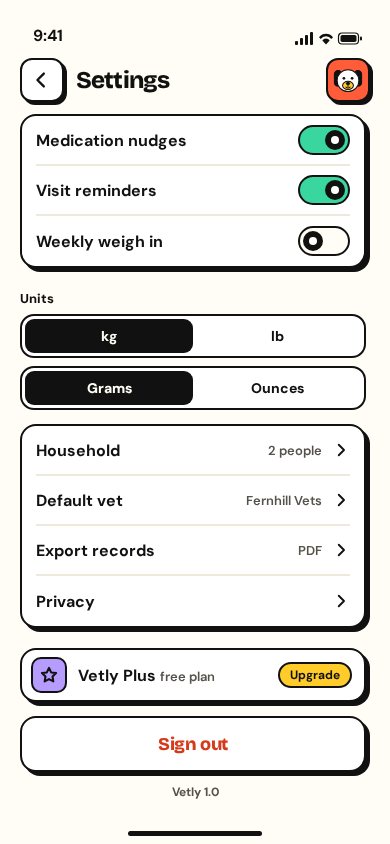
Vetly Settings screen
A settings screen from Vetly, a pet health record app template in a Neubrutalism style. Screen 25 of 25.
Vetly is a complete pet health app: welcome, sign in, adding a pet, a home with the next visit and today's meds, a book for each pet, a stamped vaccination card, vet visits as notched tickets with booking, medication reminders, a weight chart and log, a food log, nearby vets, a Plus plan, notifications, profile and settings. Every pet, stamp and pictogram is drawn.
| Detail | Value |
|---|---|
| Screen type | Settings |
| App | Vetly: Pet health record |
| Category | Lifestyle |
| Design language | Neubrutalism, light |
| Type | DM Sans |
| Colours | #fffdf5 background, #ffffff surface, #111111 text, #55524b text-muted, #ff5c39 accent, #111111 accent-contrast, #2f5bff secondary, #111111 border, #d63a1a danger |
What this screen says
- Settings
- Medication nudges
- Visit reminders
- Weekly weigh in
- Units
- kg
- lb
- Grams
- Ounces
- Household
- 2 people
- Default vet
- Fernhill Vets
- Export records
- Privacy
- Vetly Plus free plan
- Upgrade
- Sign out
- Vetly 1.0
Around it in Vetly
More settings screens
- Kino Audio and subtitles: Film and series streaming
- Waybill Delivery preferences: Every parcel, read like its label
- Torque Settings: The workshop manual for your own car
- Stitch Settings: A knitting companion drawn as one big knitting chart
- Roost Settings: Your shared house, stuck to the fridge door
- Trellis Settings: Vegetable garden planner
- Grain Settings: Camera and photo editor
- Posy Settings: Flower delivery and weekly stems
- Fern Settings: Plant care
- Doorstep Settings: Homes for sale and rent
- Rewear Settings: Secondhand fashion marketplace
- Laced Settings: Sneaker drops and raffles
Every lifestyle app settings screen
What makes a good settings screen
- Group options into clear sections. Account, notifications, privacy, appearance and help, with headings, so people scan to the right group.
- Label settings by their effect. "Daily reminder at 8:00" is clearer than "Reminders". Add a short description under options that need one.
- Use the right control. Toggles for on and off, a row that opens a list for choices, and sliders only for ranges.
- Apply changes immediately. Most mobile settings take effect when changed, with no Save button to forget.
The full settings screen guide and every example
Remix Vetly free: describe your own app and it is drawn in this design. Or get its files from $10: Figma, React Native, SwiftUI, Flutter and HTML.