Templates · Search and explore screens · Education app · Epoch
Epoch Timeline screen
A search screen from Epoch, a history on a timeline app template in a Brutalist style. Screen 5 of 25.
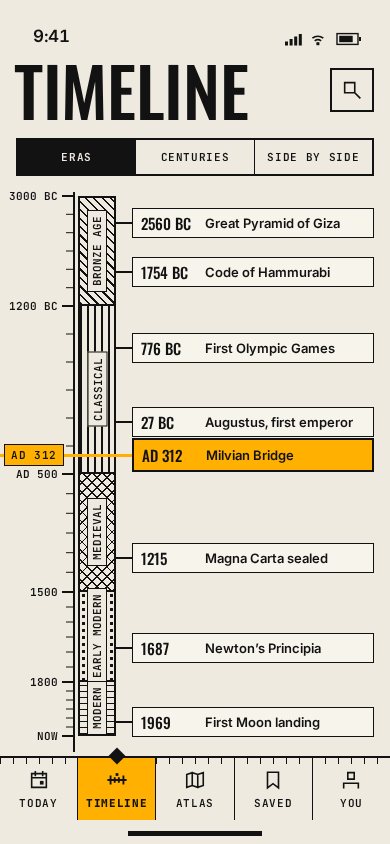
Epoch is a complete history app built around one long timeline: welcome, era picking, sign in, an on this day home, a zoomable timeline of five eras, an era page, an event, a historical figure, search, a reading lesson, an audio episode, a dot matrix atlas with a year scrubber, a meanwhile view of parallel civilisations, a quiz and its score, saved items, a personal timeline with an add event form, progress stats, notifications, a Pro plan with checkout and confirmation, profile and settings. Limestone and ink with signal amber.
| Detail | Value |
|---|---|
| Screen type | Search |
| App | Epoch: History on a timeline |
| Category | Education |
| Design language | Brutalist, light |
| Type | Oswald for headings, Inter for text |
| Colours | #eeeae0 background, #f7f4ec surface, #121212 text, #6e6a60 text-muted, #ffb000 accent, #121212 accent-contrast, #121212 secondary, #121212 border, #e0402a danger |
What this screen says
- Timeline
- Eras Centuries Side by side
- 3000 BC
- 1200 BC
- AD 500
- Now
- Bronze age
- Classical
- Medieval
- Early modern
- Modern
- 2560 BCGreat Pyramid of Giza
- 1754 BCCode of Hammurabi
- 776 BCFirst Olympic Games
- 27 BCAugustus, first emperor
- AD 312
- AD 312Milvian Bridge
- 1215Magna Carta sealed
- 1687Newton’s Principia
- 1969First Moon landing
- Today
- Atlas
- Saved
- You
Around it in Epoch
More search and explore screens
- Quad Course search: University campus app
- Palm Dictionary: Learn sign language
- Wren Library: Early reading for kids
- Proof Topics: Maths tutor that shows its working
- Skim Discover: Speed reading trainer
- Terra Explore: Geography and flags quiz
- Gambit Openings: Chess training
- Buzzer Categories: Live trivia
- Parla Dictionary: Language learning
- Recall Shared decks: Flashcards and spaced repetition
- Numo Practice: Kids maths game
- Syntax Snippets: Learn to code
Every education app search screen
What makes a good search screen
- Show something before people type. Recent searches, popular items or categories make the empty search screen useful and save typing.
- Suggest as people type. Autocomplete with matching items, not only matching words, lets people jump straight to a result.
- Make filters visible and reversible. Show active filters as chips that can be removed in one tap, and the number of results as filters change.
- Forgive typos. Close matches and "Did you mean" stop a spelling mistake from ending in an empty screen.
The full search screen guide and every example
Remix Epoch free: describe your own app and it is drawn in this design. Or get its files from $10: Figma, React Native, SwiftUI, Flutter and HTML.