Templates · Settings screens · Lifestyle app · Emporia
Emporia Settings screen
A settings screen from Emporia, an everything store app template in a Minimal style. Screen 25 of 25.
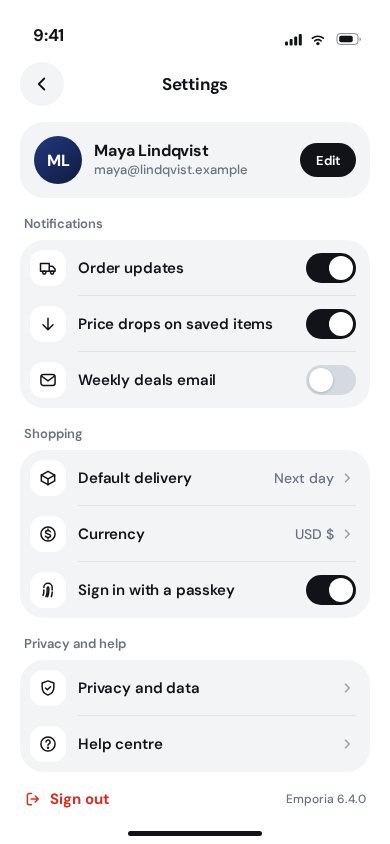
Emporia is a complete shopping app for an everything store: welcome, sign in, a home with a deals countdown, categories, filters, search and results, a product page with swatches, reviews and compare, cart, checkout with address and payment, order confirmation, orders, live order tracking, returns, a wishlist, deals, a membership and account. White and soft grey with ink, one vivid orange and deep navy.
| Detail | Value |
|---|---|
| Screen type | Settings |
| App | Emporia: Everything store |
| Category | Lifestyle |
| Design language | Minimal, light |
| Type | DM Sans |
| Colours | #ffffff background, #f3f4f6 surface, #111318 text, #6b7280 text-muted, #ff5a1f accent, #ffffff accent-contrast, #0f1b3d secondary, #e7e9ee border, #d92d20 danger |
What this screen says
- Settings
- ML
- Maya Lindqvist
- maya@lindqvist.example
- Edit
- Notifications
- Order updates
- Price drops on saved items
- Weekly deals email
- Shopping
- Default deliveryNext day
- CurrencyUSD $
- Sign in with a passkey
- Privacy and help
- Privacy and data
- Help centre
- Sign outEmporia 6.4.0
Around it in Emporia
More settings screens
- Tidy Settings: Book home cleaners
- Dorm Settings: Find student housing
- Hem Settings: Tailoring and alterations, collected
- Lendly Settings: Borrow things from neighbours
- Stub Settings: Fan to fan ticket resale
- Trove Settings: Visual ideas and boards
- Vidi Settings: Video platform for creators
- Roll Settings: Photo library and backups
- Splice Settings: Video editor for short clips
- Blush Settings: Beauty and makeup shopping
- Flatpack Settings: Furniture store with room previews
- Column Settings: Newsletters and independent writers
Every lifestyle app settings screen
What makes a good settings screen
- Group options into clear sections. Account, notifications, privacy, appearance and help, with headings, so people scan to the right group.
- Label settings by their effect. "Daily reminder at 8:00" is clearer than "Reminders". Add a short description under options that need one.
- Use the right control. Toggles for on and off, a row that opens a list for choices, and sliders only for ranges.
- Apply changes immediately. Most mobile settings take effect when changed, with no Save button to forget.
The full settings screen guide and every example
Remix Emporia free: describe your own app and it is drawn in this design. Or get its files from $10: Figma, React Native, SwiftUI, Flutter and HTML.