Templates · Success and confirmation screens · Productivity app · Deskly
Deskly Checked in screen
A success screen from Deskly, a hybrid office booking app template in an Enterprise style. Screen 9 of 25.
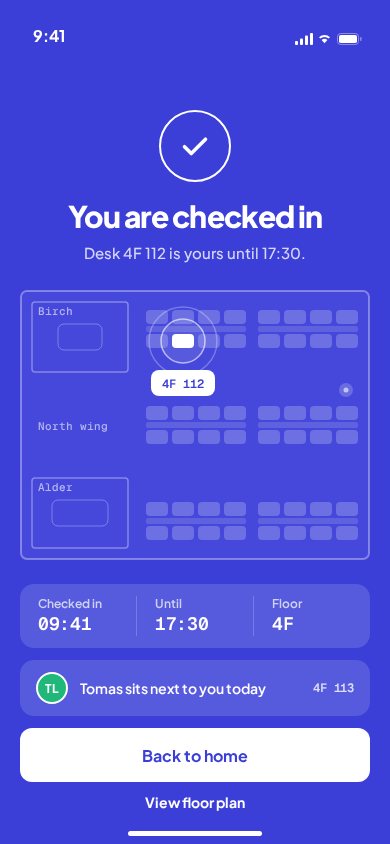
Deskly is a complete hybrid office app: welcome, sign in, picking your office and your office days, a home with today's desk on the plan, a live floor plan, desk detail and booking, check in, meeting rooms with capacity and equipment, who is in, finding a colleague, search, your bookings and week, visitors with a pass and a drawn QR square, insights, a Teams plan, notifications, profile and settings. Every plan, room and pass is drawn.
| Detail | Value |
|---|---|
| Screen type | Success |
| App | Deskly: Hybrid office booking |
| Category | Productivity |
| Design language | Enterprise, light |
| Type | Plus Jakarta Sans |
| Colours | #f3f4f7 background, #ffffff surface, #151833 text, #6b7090 text-muted, #3b3fd8 accent, #ffffff accent-contrast, #1fb87a success, #f5a623 warning, #e3e5ee border |
What this screen says
- You are checked in
- Desk 4F 112 is yours until 17:30.
- Checked in
- Until
- Floor
- 4F
- TL Tomas sits next to you today 4F 113
- Back to home
- View floor plan
Around it in Deskly
More success and confirmation screens
- Token Account added: Two-factor codes and sign-in approvals
- Beam Sent: Send big files
- Parchment Invite sent: Documents, edit and share
- Lectern Exported: Slides and presenter remote
- Ringer Call ended: Phone, contacts and voicemail
- Pipeline Deal won: Sales CRM on the road
- Aim Check in saved: Goals and key results
- Scribe Shared: Voice memos to notes
- Inkline Signed: Sign and send contracts
- Dispatch Job closed: Field service jobs for technicians
- Stashed: Read-it-later and highlights
- Uptime Resolved: Server and site monitoring
Every productivity app success screen
What makes a good confirmation screen
- Confirm in the headline. "Payment sent", "Table booked for Friday at 8" or "Lesson complete" in plain words, with a clear success colour or icon.
- Repeat the key details. Amount, date, reference number or score, so people do not need to check elsewhere that the right thing happened.
- Say what happens next. When the order arrives, when the money lands, when the next lesson unlocks.
- Offer the next step. Track the order, add to calendar, share, or start the next lesson. One primary action and a way back home.
The full confirmation screen guide and every example
Remix Deskly free: describe your own app and it is drawn in this design. Or get its files from $10: Figma, React Native, SwiftUI, Flutter and HTML.