Templates · Success and confirmation screens · Productivity app · Stash
Stashed screen
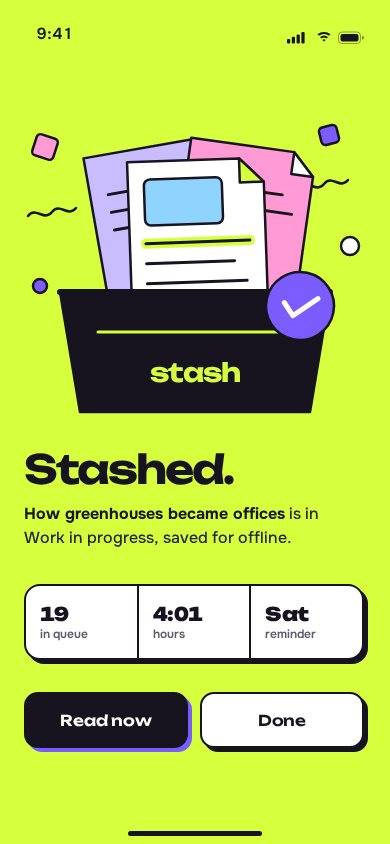
A success screen from Stash, a productivity app template in a Neubrutalism style. Screen 16 of 25.
Stash is a complete read-it-later app: welcome, interests and sign in, a home with the article you are halfway through and what is up next, a library with collections, full text search, a reader with highlights and notes, display settings, listening with a waveform player, a highlights feed, shareable quote cards, collections, saving a link with a stashed confirmation, a daily review of old highlights, reading stats, a newsletter inbox, a publication page, a Plus plan with checkout, notifications, profile and settings. Lilac paper, ink borders and hard shadows, with lime highlighter kept for what you saved, what is selected and the main action.
| Detail | Value |
|---|---|
| Screen type | Success |
| App | Stash: Read-it-later and highlights |
| Category | Productivity |
| Design language | Neubrutalism, light |
| Type | Unbounded for headings, Onest for text |
| Colours | #efeaff background, #ffffff surface, #17141f text, #5f5a6e text-muted, #d6ff3d accent, #17141f accent-contrast, #7a5cff secondary, #17141f border, #ff5a4e danger |
What this screen says
- Stashed.
- How greenhouses became offices is in Work in progress, saved for offline.
- 19in queue
- 4:01hours
- Satreminder
- Read now
- Done
Around it in Stash
More success and confirmation screens
- Opal Invoice sent: Studio dashboard
- Jot Invite sent: Quick notes and checklists
- Chrono Invite sent: World clock, timers and stopwatch
- Frontdesk Solved: Customer support inbox
- Campaign Scheduled: Email marketing campaigns
- Outpost Scheduled: Schedule social posts
- Pageview Alert saved: Website analytics
- Polish Upgraded: Writing assistant and keyboard
- Tapline Tip sent: Link-in-bio pages and analytics
- Quill Upgraded: Docs, wikis and databases in one workspace
- Tandem Channel created: Team chat, channels and huddles
- Shipyard Cycle closed: Issue tracking for product teams
Every productivity app success screen
What makes a good confirmation screen
- Confirm in the headline. "Payment sent", "Table booked for Friday at 8" or "Lesson complete" in plain words, with a clear success colour or icon.
- Repeat the key details. Amount, date, reference number or score, so people do not need to check elsewhere that the right thing happened.
- Say what happens next. When the order arrives, when the money lands, when the next lesson unlocks.
- Offer the next step. Track the order, add to calendar, share, or start the next lesson. One primary action and a way back home.
The full confirmation screen guide and every example
Remix Stash free: describe your own app and it is drawn in this design. Or get its files from $10: Figma, React Native, SwiftUI, Flutter and HTML.