Templates · List and feed screens · Productivity app · Deskly
Deskly Rooms screen
A list screen from Deskly, a hybrid office booking app template in an Enterprise style. Screen 10 of 25.
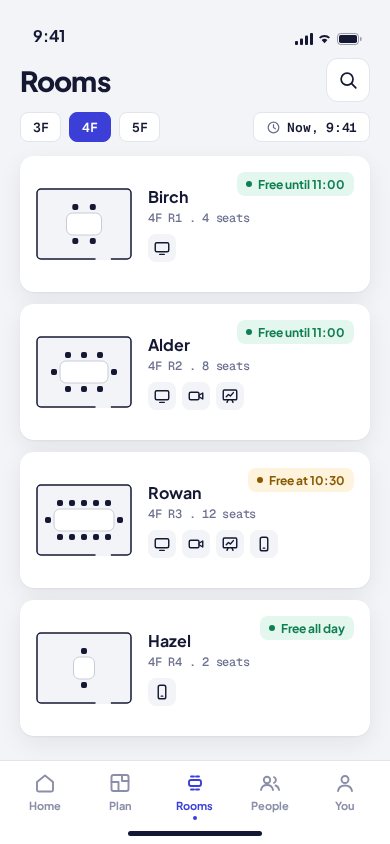
Deskly is a complete hybrid office app: welcome, sign in, picking your office and your office days, a home with today's desk on the plan, a live floor plan, desk detail and booking, check in, meeting rooms with capacity and equipment, who is in, finding a colleague, search, your bookings and week, visitors with a pass and a drawn QR square, insights, a Teams plan, notifications, profile and settings. Every plan, room and pass is drawn.
| Detail | Value |
|---|---|
| Screen type | List |
| App | Deskly: Hybrid office booking |
| Category | Productivity |
| Design language | Enterprise, light |
| Type | Plus Jakarta Sans |
| Colours | #f3f4f7 background, #ffffff surface, #151833 text, #6b7090 text-muted, #3b3fd8 accent, #ffffff accent-contrast, #1fb87a success, #f5a623 warning, #e3e5ee border |
What this screen says
- Rooms
- 3F 4F 5F Now, 9:41
- Birch
- 4F R1 . 4 seats
- Free until 11:00
- Alder
- 4F R2 . 8 seats
- Rowan
- 4F R3 . 12 seats
- Free at 10:30
- Hazel
- 4F R4 . 2 seats
- Free all day
- Home
- Plan
- People
- You
Around it in Deskly
More list and feed screens
- Streak Friends: Small days, long chains
- Pomo Notifications: Focus timer
- Postbox Swipe actions: Email for busy teams
- Daybook Day: Calendar and planner
- Scanly Notifications: Document scanner
- Keyring Logins: Password manager
- Rota Notifications: Shift scheduling for hourly teams
- Inkwell Prompts: Daily journal
- Shortlist Notifications: Job search and application tracker
- Parley Add members: Team messenger
- Docket Notifications: Task and sprint planner
- Kanso Notifications: Tasks, calendar and chat
Every productivity app list screen
What makes a good list screen
- Show what people need to decide. Each row should carry just enough to choose: a title, one or two details and a status. Everything else belongs on the detail screen.
- Keep rows consistent. The same information in the same place on every row lets people scan down a column instead of reading each item.
- Group with headings. Dates, categories or status headings break long lists into chunks people can skip through.
- Make common actions quick. Swipe actions, a checkbox or a heart on the row save opening the item for small tasks.
The full list screen guide and every example
Remix Deskly free: describe your own app and it is drawn in this design. Or get its files from $10: Figma, React Native, SwiftUI, Flutter and HTML.