Templates · Success and confirmation screens · Productivity app · Uptime
Uptime Resolved screen
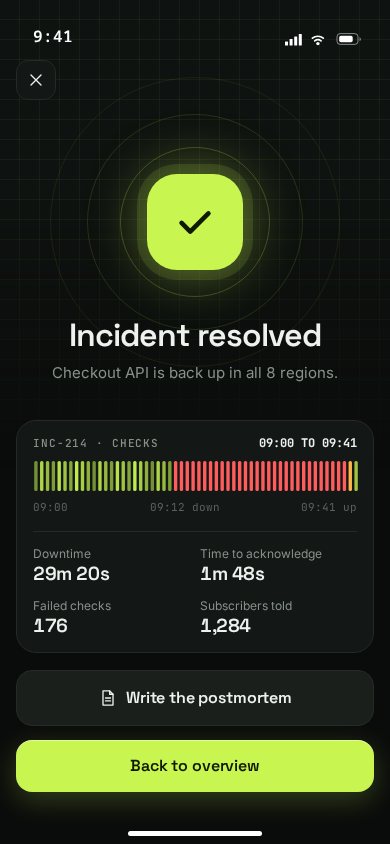
A success screen from Uptime, a server and site monitoring app template in a Dark-first style. Screen 13 of 25.
Uptime is a complete uptime and incident app: welcome, sign in and two factor, an overview with the live response trace and an active outage, monitors with heartbeat strips, a monitor with its response chart, a timing breakdown, a dotted world map of probe regions, a live check log, incidents with a timeline, posting an update and resolving it, a new monitor form, alert rules, the public status page, on call rotation, certificates, alert channels, SLA reports, notifications, a Team plan with checkout, profile and settings. Near black with phosphor lime, amber and coral.
| Detail | Value |
|---|---|
| Screen type | Success |
| App | Uptime: Server and site monitoring |
| Category | Productivity |
| Design language | Dark-first, dark |
| Type | Space Grotesk for headings, Inter for text |
| Colours | #0a0c0b background, #131715 surface, #edf2ee text, #87918a text-muted, #c8f550 accent, #0f1a00 accent-contrast, #ffb547 secondary, #242a26 border, #ff5d5d danger |
What this screen says
- Incident resolved
- Checkout API is back up in all 8 regions.
- INC-214 · checks 09:00 to 09:41
- 09:00 09:12 down 09:41 up
- Downtime 29m 20s
- Time to acknowledge 1m 48s
- Failed checks 176
- Subscribers told 1,284
- Write the postmortem
- Back to overview
Around it in Uptime
More success and confirmation screens
- Scanly Exported: Document scanner
- Keyring Item saved: Password manager
- Rota Shift summary: Shift scheduling for hourly teams
- Inkwell Entry saved: Daily journal
- Shortlist Application sent: Job search and application tracker
- Parley Group created: Team messenger
- Docket Sprint done: Task and sprint planner
- Kanso Task done: Tasks, calendar and chat
- Margin Upgraded: AI note taking
- Aide Session complete: Executive AI assistant
- Juno Subscribed: AI chat assistant
- Opal Invoice sent: Studio dashboard
Every productivity app success screen
What makes a good confirmation screen
- Confirm in the headline. "Payment sent", "Table booked for Friday at 8" or "Lesson complete" in plain words, with a clear success colour or icon.
- Repeat the key details. Amount, date, reference number or score, so people do not need to check elsewhere that the right thing happened.
- Say what happens next. When the order arrives, when the money lands, when the next lesson unlocks.
- Offer the next step. Track the order, add to calendar, share, or start the next lesson. One primary action and a way back home.
The full confirmation screen guide and every example
Remix Uptime free: describe your own app and it is drawn in this design. Or get its files from $10: Figma, React Native, SwiftUI, Flutter and HTML.