Templates · Settings screens · Fitness app · Cradle
Cradle Settings screen
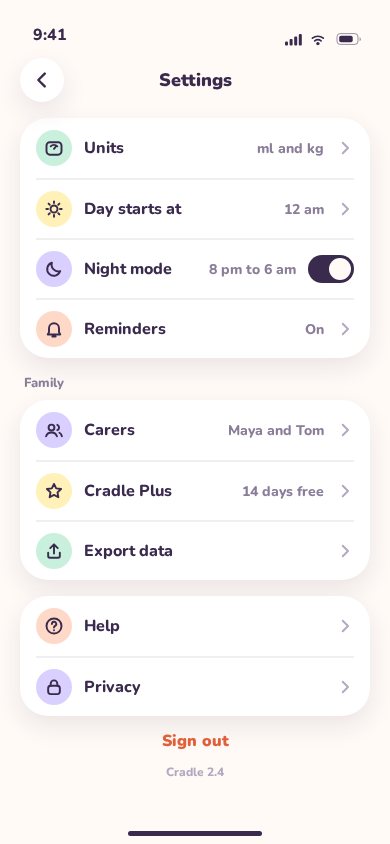
A settings screen from Cradle, a baby tracker app template in a Playful style. Screen 25 of 25.
Cradle is cradle logs feeds, sleep and nappies in one tap and draws the day as a 24 hour ribbon. It covers growth curves with percentile bands, milestones, a weekly summary, handover notes between two carers and a deep plum night mode for the 3 am feed.
| Detail | Value |
|---|---|
| Screen type | Settings |
| App | Cradle: Baby tracker |
| Category | Health and fitness |
| Design language | Playful, light |
| Type | Nunito |
| Colours | #fffaf6 background, #ffffff surface, #3a2a4d text, #ffd9c7 feeds, #d9d0ff accent, #fff1b8 milestones, #c9f0dd nappies and growth, #2a1c3d night mode |
What this screen says
- Settings
- Unitsml and kg
- Day starts at12 am
- Night mode8 pm to 6 am
- RemindersOn
- Family
- CarersMaya and Tom
- Cradle Plus14 days free
- Export data
- Help
- Privacy
- Sign out
- Cradle 2.4
Around it in Cradle
More settings screens
- Morsel Reminders: AI calorie tracker
- Dew Settings: AI skin scan and routine
- Donor Settings: Blood donation, counted drop by drop
- Unfold Settings: Yoga and stretching
- Kilo Settings: Strength training log
- Cyra Reminders: Cycle tracker
- Harbor Settings: Therapy and mood
- Fasten Settings: Intermittent fasting
- Plate Settings: Calorie and macro tracker
- Vita Settings: Personal health record
- Forge Settings: AI fitness and nutrition
- Lull Settings: Sleep sounds and meditation
Every fitness app settings screen
What makes a good settings screen
- Group options into clear sections. Account, notifications, privacy, appearance and help, with headings, so people scan to the right group.
- Label settings by their effect. "Daily reminder at 8:00" is clearer than "Reminders". Add a short description under options that need one.
- Use the right control. Toggles for on and off, a row that opens a list for choices, and sliders only for ranges.
- Apply changes immediately. Most mobile settings take effect when changed, with no Save button to forget.
The full settings screen guide and every example
Remix Cradle free: describe your own app and it is drawn in this design. Or get its files from $10: Figma, React Native, SwiftUI, Flutter and HTML.