Templates · Settings screens · Fitness app · Unfold
Unfold Settings screen
A settings screen from Unfold, a yoga and stretching app template in a Minimal style. Screen 25 of 25.
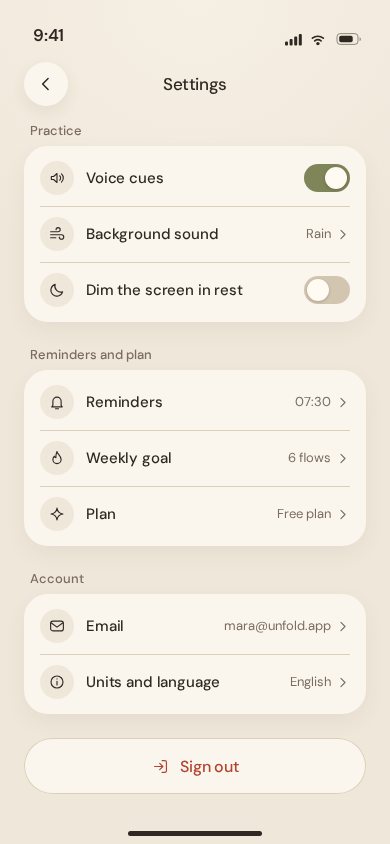
Unfold is a complete yoga and stretching app: welcome, sign in and a short setup, a home with today's flow and the week at a glance, classes and a class page with its pose sequence, a guided player, a check in and a finish screen, a pose library with drawn figures, search, a flow builder, programs, breathwork with a breath timer, a streak calendar, progress charts, reminders, notifications, a Plus plan, profile and settings. Everything sits in arches on warm sand, drawn in a single calm line.
| Detail | Value |
|---|---|
| Screen type | Settings |
| App | Unfold: Yoga and stretching |
| Category | Health and fitness |
| Design language | Minimal, light |
| Type | DM Sans |
| Colours | #efe7da background, #faf6ee surface, #2f2822 text, #7a6d5f text-muted, #b9684a accent, #fffaf2 accent-contrast, #7f8459 secondary, #dccfba border, #b4432f danger |
What this screen says
- Settings
- Practice
- Voice cues
- Background soundRain
- Dim the screen in rest
- Reminders and plan
- Reminders07:30
- Weekly goal6 flows
- PlanFree plan
- Account
- Emailmara@unfold.app
- Units and languageEnglish
- Sign out
Around it in Unfold
More settings screens
- Dew Settings: AI skin scan and routine
- Cradle Settings: Baby tracker
- Donor Settings: Blood donation, counted drop by drop
- Kilo Settings: Strength training log
- Cyra Reminders: Cycle tracker
- Harbor Settings: Therapy and mood
- Fasten Settings: Intermittent fasting
- Plate Settings: Calorie and macro tracker
- Vita Settings: Personal health record
- Forge Settings: AI fitness and nutrition
- Lull Settings: Sleep sounds and meditation
- Pace Settings: Fitness tracker
Every fitness app settings screen
What makes a good settings screen
- Group options into clear sections. Account, notifications, privacy, appearance and help, with headings, so people scan to the right group.
- Label settings by their effect. "Daily reminder at 8:00" is clearer than "Reminders". Add a short description under options that need one.
- Use the right control. Toggles for on and off, a row that opens a list for choices, and sliders only for ranges.
- Apply changes immediately. Most mobile settings take effect when changed, with no Save button to forget.
The full settings screen guide and every example
Remix Unfold free: describe your own app and it is drawn in this design. Or get its files from $10: Figma, React Native, SwiftUI, Flutter and HTML.