Templates · Profile screens · Fitness app · Cradle
Cradle Profile screen
A profile screen from Cradle, a baby tracker app template in a Playful style. Screen 24 of 25.
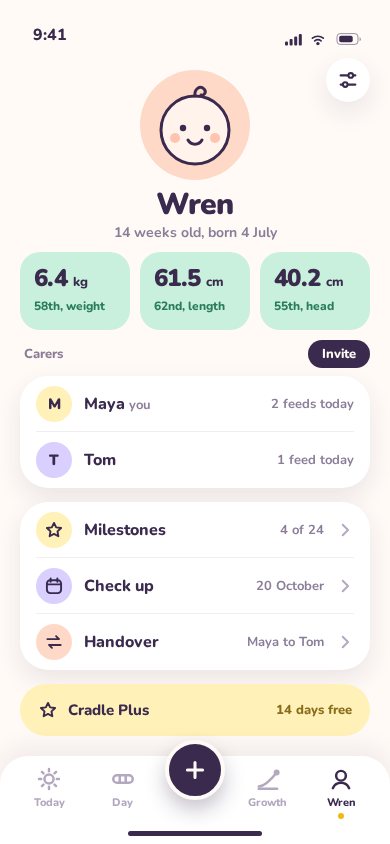
Cradle is cradle logs feeds, sleep and nappies in one tap and draws the day as a 24 hour ribbon. It covers growth curves with percentile bands, milestones, a weekly summary, handover notes between two carers and a deep plum night mode for the 3 am feed.
| Detail | Value |
|---|---|
| Screen type | Profile |
| App | Cradle: Baby tracker |
| Category | Health and fitness |
| Design language | Playful, light |
| Type | Nunito |
| Colours | #fffaf6 background, #ffffff surface, #3a2a4d text, #ffd9c7 feeds, #d9d0ff accent, #fff1b8 milestones, #c9f0dd nappies and growth, #2a1c3d night mode |
What this screen says
- Wren
- 14 weeks old, born 4 July
- 6.4 kg58th, weight
- 61.5 cm62nd, length
- 40.2 cm55th, head
- Carers
- Invite
- MMayayou2 feeds today
- TTom1 feed today
- Milestones4 of 24
- Check up20 October
- HandoverMaya to Tom
- Cradle Plus 14 days free
- Today
- Day
- Growth
Around it in Cradle
More profile screens
- Tabata Profile: HIIT interval timer
- Jab Coach: Boxing workouts with a smart bag
- Exhale Guide: Breathwork sessions
- Bump Profile: Pregnancy week by week
- Locker Coach: Gym membership and class booking
- Dew Profile: AI skin scan and routine
- Medly Profile: Doctor on call
- Donor Profile: Blood donation, counted drop by drop
- Unfold Profile: Yoga and stretching
- Kilo Profile: Strength training log
- Cyra Profile: Cycle tracker
- Harbor Profile: Therapy and mood
Every fitness app profile screen
What makes a good profile screen
- Lead with identity. Photo, name and one line about the person at the top. It confirms whose profile this is.
- Show meaningful stats. Two to four numbers that matter in this app, like workouts, followers, books read or streak.
- Make editing obvious for the owner. An Edit profile button near the top, shown only on your own profile.
- Organise content with tabs. Posts, activity, saved or achievements as tabs keep a long profile tidy.
The full profile screen guide and every example
Remix Cradle free: describe your own app and it is drawn in this design. Or get its files from $10: Figma, React Native, SwiftUI, Flutter and HTML.