Templates · Settings screens · Fitness app · Plate
Plate Settings screen
A settings screen from Plate, a calorie and macro tracker app template in a Clinical style. Screen 25 of 25.
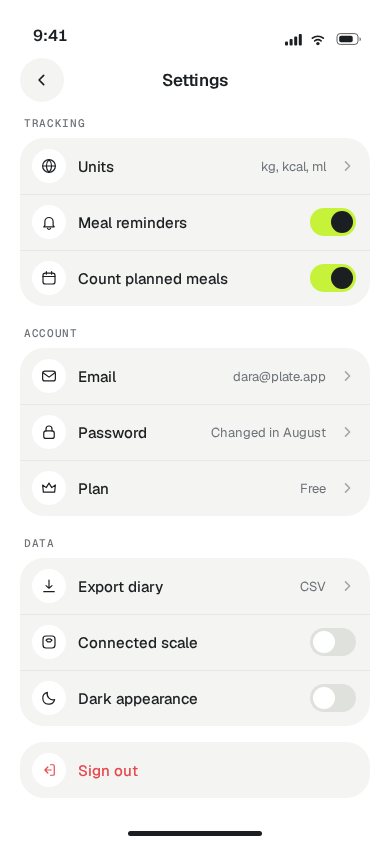
Plate is a complete calorie and macro tracking app: welcome, sign in, goal and daily target setup, a today screen with calories eaten, planned and left, a diary by meal, food search, a food with its serving and nutrition label, barcode and photo scanning, quick add on a keypad, a meal in detail, macro rings, water, recipes, weight with a trend line, a weekly report, a Plus plan, notifications, profile and settings. Eaten is solid, planned is hatched, and every number carries its unit.
| Detail | Value |
|---|---|
| Screen type | Settings |
| App | Plate: Calorie and macro tracker |
| Category | Health and fitness |
| Design language | Clinical, light |
| Type | Geist |
| Colours | #ffffff background, #f4f5f2 surface, #1c1f22 text, #6c7278 text-muted, #c7f23a accent, #1c1f22 accent-contrast, #aeb4b9 secondary, #e6e8e3 border, #e5484d danger |
What this screen says
- Settings
- Tracking
- Units
- kg, kcal, ml
- Meal reminders
- Count planned meals
- Account
- dara@plate.app
- Password
- Changed in August
- Plan
- Free
- Data
- Export diary
- CSV
- Connected scale
- Dark appearance
- Sign out
Around it in Plate
More settings screens
- Segment Settings: Runs and rides with friends
- Nightly Settings: Smart ring sleep and readiness
- Pillbox Settings: Pharmacy refills and medicine reminders
- Rise Settings: Alarm clock and sleep cycles
- Ward Settings: Patient portal for results, visits and messages
- Level Alerts: Glucose monitor companion
- Reformer Settings: Pilates studio booking
- Sip Settings: Water intake and hydration
- Mend Settings: Physio and rehab exercises
- Tabata Settings: HIIT interval timer
- Jab Settings: Boxing workouts with a smart bag
- Exhale Settings: Breathwork sessions
Every fitness app settings screen
What makes a good settings screen
- Group options into clear sections. Account, notifications, privacy, appearance and help, with headings, so people scan to the right group.
- Label settings by their effect. "Daily reminder at 8:00" is clearer than "Reminders". Add a short description under options that need one.
- Use the right control. Toggles for on and off, a row that opens a list for choices, and sliders only for ranges.
- Apply changes immediately. Most mobile settings take effect when changed, with no Save button to forget.
The full settings screen guide and every example
Remix Plate free: describe your own app and it is drawn in this design. Or get its files from $10: Figma, React Native, SwiftUI, Flutter and HTML.