Templates · Settings screens · Fitness app · Cyra
Cyra Reminders screen
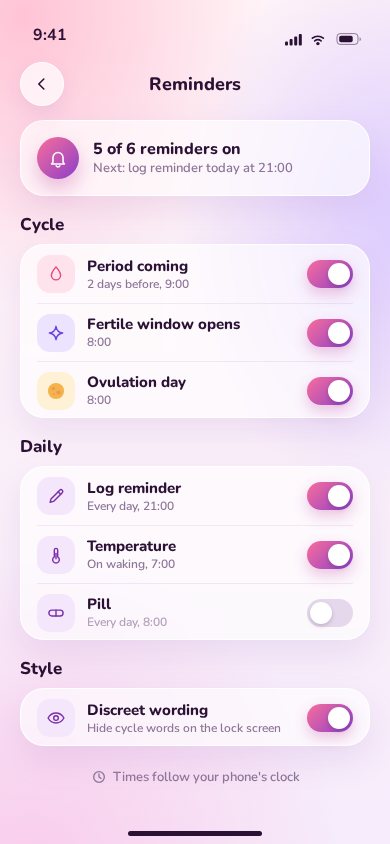
A settings screen from Cyra, a cycle tracker app template in a Glass style. Screen 21 of 25.
Cyra is a complete cycle tracker: welcome, sign in, first cycle setup, a today screen with a cycle ring dial, logging flow, mood and symptoms, a calendar with period and fertile days, day detail, predictions, the fertile window, insights, cycle history, symptom patterns, a phase guide, temperature charting, a health report for a doctor, partner sharing, reminders, a Plus plan, profile and settings. Rose marks the period, violet the fertile window and a gold full moon marks ovulation.
| Detail | Value |
|---|---|
| Screen type | Settings |
| App | Cyra: Cycle tracker |
| Category | Health and fitness |
| Design language | Glass, light |
| Type | Nunito |
| Colours | #fdeef3 background, #ffffff surface, #2b1235 text, #8d7598 text-muted, #f0568a accent, #ffffff accent-contrast, #7a2fa8 secondary, #ecdcef border, #d9364f danger |
What this screen says
- Reminders
- 5 of 6 reminders onNext: log reminder today at 21:00
- Cycle
- Period coming2 days before, 9:00
- Fertile window opens8:00
- Ovulation day8:00
- Daily
- Log reminderEvery day, 21:00
- TemperatureOn waking, 7:00
- PillEvery day, 8:00
- Style
- Discreet wordingHide cycle words on the lock screen
- Times follow your phone's clock
Around it in Cyra
More settings screens
- Flexpass Settings: One membership, many studios
- Clinic Settings: Find and book doctors
- Careline Settings: Care for an ageing parent
- Velo Settings: Live and on-demand indoor cycling
- Vantage Device: Sports watch companion
- Labwork Settings: Book blood tests and see results
- Segment Settings: Runs and rides with friends
- Nightly Settings: Smart ring sleep and readiness
- Pillbox Settings: Pharmacy refills and medicine reminders
- Rise Settings: Alarm clock and sleep cycles
- Ward Settings: Patient portal for results, visits and messages
- Level Alerts: Glucose monitor companion
Every fitness app settings screen
What makes a good settings screen
- Group options into clear sections. Account, notifications, privacy, appearance and help, with headings, so people scan to the right group.
- Label settings by their effect. "Daily reminder at 8:00" is clearer than "Reminders". Add a short description under options that need one.
- Use the right control. Toggles for on and off, a row that opens a list for choices, and sliders only for ranges.
- Apply changes immediately. Most mobile settings take effect when changed, with no Save button to forget.
The full settings screen guide and every example
Remix Cyra free: describe your own app and it is drawn in this design. Or get its files from $10: Figma, React Native, SwiftUI, Flutter and HTML.