Templates · Settings screens · Productivity app · Branch
Branch Settings screen
A settings screen from Branch, a mind maps app template in a Playful style. Screen 25 of 25.
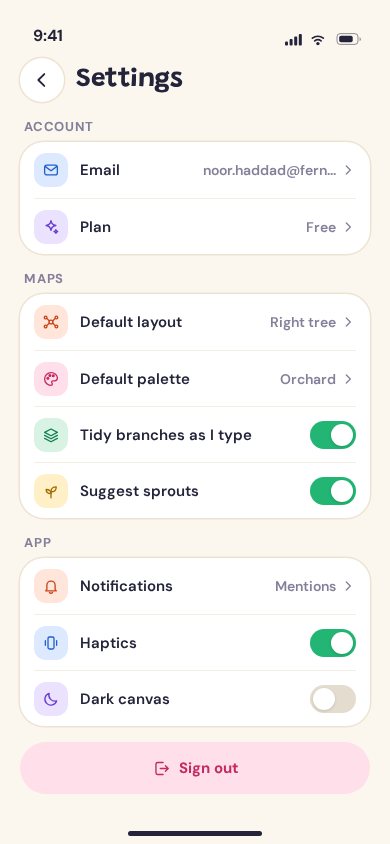
Branch is a complete mind mapping app: welcome, a pick your first map step, sign in, a home with the map you are growing and a daily seed prompt, a library of maps, search across ideas and notes, a full canvas editor, an idea with photos, notes and a checklist, adding a branch, map style, an outline view, a timed idea sprint, AI sprouts, templates and a template preview, sharing, a live session with cursors and a huddle, comments, export to a PDF poster and its success screen, insights, a Plus plan, notifications, profile and settings. Warm paper and ink with six bright branch colours.
| Detail | Value |
|---|---|
| Screen type | Settings |
| App | Branch: Mind maps |
| Category | Productivity |
| Design language | Playful, light |
| Type | Grandstander for headings, DM Sans for text |
| Colours | #fbf7ee background, #ffffff surface, #23233a text, #85809a text-muted, #ff6b3d accent, #ffffff accent-contrast, #22b573 secondary, #ece4d3 border, #ff4f8b danger |
What this screen says
- Settings
- Account
- noor.haddad@fern...
- Plan
- Free
- Maps
- Default layout
- Right tree
- Default palette
- Orchard
- Tidy branches as I type
- Suggest sprouts
- App
- Notifications
- Mentions
- Haptics
- Dark canvas
- Sign out
Around it in Branch
More settings screens
- Postbox Settings: Email for busy teams
- Daybook Settings: Calendar and planner
- Scanly Settings: Document scanner
- Keyring Autofill: Password manager
- Rota Settings: Shift scheduling for hourly teams
- Inkwell Settings: Daily journal
- Shortlist Settings: Job search and application tracker
- Parley Settings: Team messenger
- Docket Settings: Task and sprint planner
- Kanso Settings: Tasks, calendar and chat
- Margin Settings: AI note taking
- Aide Settings: Executive AI assistant
Every productivity app settings screen
What makes a good settings screen
- Group options into clear sections. Account, notifications, privacy, appearance and help, with headings, so people scan to the right group.
- Label settings by their effect. "Daily reminder at 8:00" is clearer than "Reminders". Add a short description under options that need one.
- Use the right control. Toggles for on and off, a row that opens a list for choices, and sliders only for ranges.
- Apply changes immediately. Most mobile settings take effect when changed, with no Save button to forget.
The full settings screen guide and every example
Remix Branch free: describe your own app and it is drawn in this design. Or get its files from $10: Figma, React Native, SwiftUI, Flutter and HTML.