Templates · Settings screens · Productivity app · Daybook
Daybook Settings screen
A settings screen from Daybook, a calendar and planner app template in a Minimal style. Screen 25 of 25.
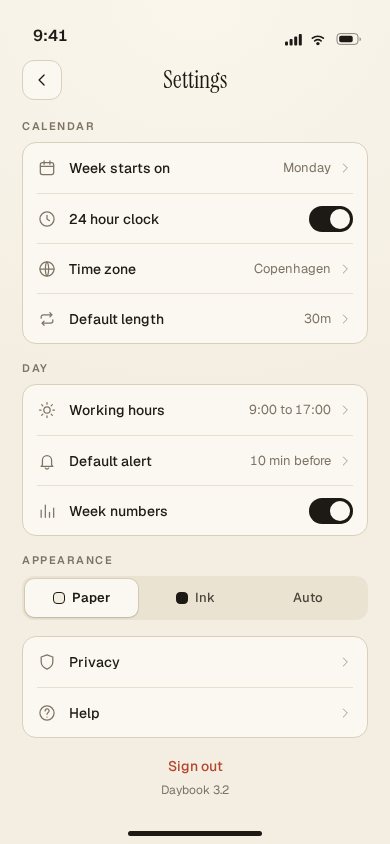
Daybook is a complete calendar and planner: welcome, sign in, a code and connecting calendars, a today page with what is next, day, week and month views, an event with guests and replies, new event, find a time across people, search, booking links with availability and a guest booking page, tasks, time insights, notifications, a Plus plan, profile and settings. Work is ink, personal is ochre and focus time is hatched, so a week reads at a glance without a rainbow.
| Detail | Value |
|---|---|
| Screen type | Settings |
| App | Daybook: Calendar and planner |
| Category | Productivity |
| Design language | Minimal, light |
| Type | Geist |
| Colours | #f4eee2 background, #fbf8f1 surface, #1d1a15 text, #7d7466 text-muted, #c4892a accent, #1d1a15 accent-contrast, #ebe3d2 secondary, #d9cfbb border, #b5452c danger |
What this screen says
- Settings
- Calendar
- Week starts on
- Monday
- 24 hour clock
- Time zone
- Copenhagen
- Default length
- 30m
- Day
- Working hours
- 9:00 to 17:00
- Default alert
- 10 min before
- Week numbers
- Appearance
- Paper Ink Auto
- Privacy
- Help
- Sign out
- Daybook 3.2
Around it in Daybook
More settings screens
- Glossa Settings: Translate text, voice and camera
- Layout Settings: Design anything from templates
- Tick Settings: To-do lists and reminders
- Beacon Left behind: Find your devices and people
- Staffroom Settings: HR, payslips and time off
- Slot Settings: Booking links and meeting scheduling
- Sheet Settings: Spreadsheets and databases
- Tunnel Protocol: VPN and online privacy
- Ping Settings: Internet speed test
- Glance Settings: Visual search with the camera
- Replay Settings: Record and share screen videos
- Easel Settings: Collaborative whiteboard
Every productivity app settings screen
What makes a good settings screen
- Group options into clear sections. Account, notifications, privacy, appearance and help, with headings, so people scan to the right group.
- Label settings by their effect. "Daily reminder at 8:00" is clearer than "Reminders". Add a short description under options that need one.
- Use the right control. Toggles for on and off, a row that opens a list for choices, and sliders only for ranges.
- Apply changes immediately. Most mobile settings take effect when changed, with no Save button to forget.
The full settings screen guide and every example
Remix Daybook free: describe your own app and it is drawn in this design. Or get its files from $10: Figma, React Native, SwiftUI, Flutter and HTML.