Templates · Settings screens · Productivity app · Rota
Rota Settings screen
A settings screen from Rota, a shift scheduling for hourly teams app template in an Enterprise style. Screen 25 of 25.
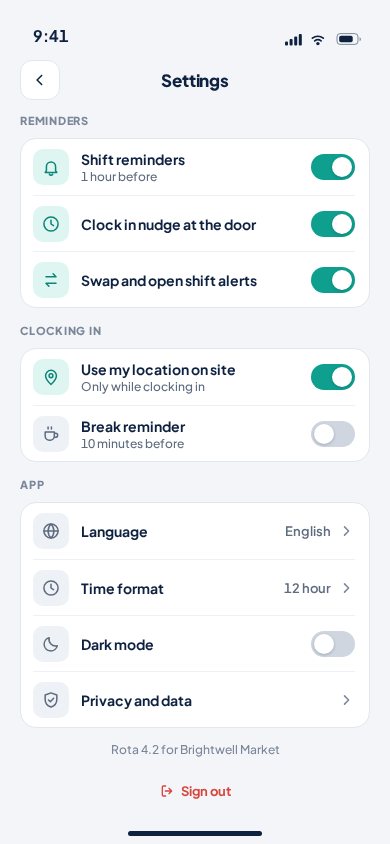
Rota is a complete workforce app for people paid by the hour: welcome, sign in, joining a team with a code, a home with the live shift, the week as colour coded shift blocks, shift detail, clocking in on site with breaks and a shift summary, open shifts, swap requests, availability and time off, a timesheet table with entry fixes, a pay estimate and payslip, the team rota, teammates, notifications, profile and settings. Opening, mid and close shifts keep their own colour on every screen.
| Detail | Value |
|---|---|
| Screen type | Settings |
| App | Rota: Shift scheduling for hourly teams |
| Category | Productivity |
| Design language | Enterprise, light |
| Type | Plus Jakarta Sans |
| Colours | #f3f5f8 background, #ffffff surface, #0e2240 text, #5d6b7e text-muted, #0b8577 accent, #ffffff accent-contrast, #f5a524 secondary, #e2e7ee border, #d9453c danger |
What this screen says
- Settings
- Reminders
- Shift reminders
- 1 hour before
- Clock in nudge at the door
- Swap and open shift alerts
- Clocking in
- Use my location on site
- Only while clocking in
- Break reminder
- 10 minutes before
- App
- Language
- English
- Time format
- 12 hour
- Dark mode
- Privacy and data
- Rota 4.2 for Brightwell Market
- Sign out
Around it in Rota
More settings screens
- Canvas Settings: Design files and comments on mobile
- Merge Settings: Code, pull requests and reviews
- Query Settings: AI answers with sources
- Glossa Settings: Translate text, voice and camera
- Layout Settings: Design anything from templates
- Tick Settings: To-do lists and reminders
- Beacon Left behind: Find your devices and people
- Staffroom Settings: HR, payslips and time off
- Slot Settings: Booking links and meeting scheduling
- Sheet Settings: Spreadsheets and databases
- Tunnel Protocol: VPN and online privacy
- Ping Settings: Internet speed test
Every productivity app settings screen
What makes a good settings screen
- Group options into clear sections. Account, notifications, privacy, appearance and help, with headings, so people scan to the right group.
- Label settings by their effect. "Daily reminder at 8:00" is clearer than "Reminders". Add a short description under options that need one.
- Use the right control. Toggles for on and off, a row that opens a list for choices, and sliders only for ranges.
- Apply changes immediately. Most mobile settings take effect when changed, with no Save button to forget.
The full settings screen guide and every example
Remix Rota free: describe your own app and it is drawn in this design. Or get its files from $10: Figma, React Native, SwiftUI, Flutter and HTML.