Templates · Settings screens · Social app · Vista
Vista Settings screen
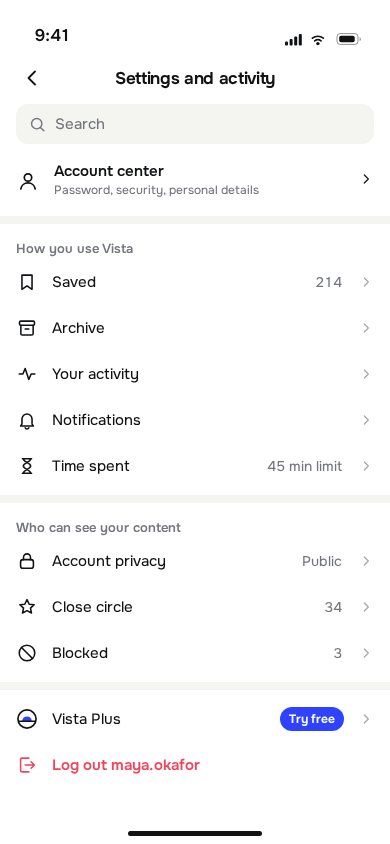
A settings screen from Vista, a social app template in a Minimal style. Screen 25 of 25.
Vista is a complete photo, stories and reels app: welcome, interests and sign in, a home feed with segmented story rings and inset rounded posts, a story viewer, a post with its comments, explore with a mosaic grid, search, a place page with a map, full screen reels, a story camera, filters, a new post form with a shared confirmation, boosting a post with a budget and checkout, direct messages with notes and a chat, activity, your profile and a creator profile, insights, saved collections, a Plus plan and settings. White and ink with one ultramarine accent, a sun yellow close circle and an editorial serif.
| Detail | Value |
|---|---|
| Screen type | Settings |
| App | Vista: Photos, stories and reels |
| Category | Social |
| Design language | Minimal, light |
| Type | Instrument Serif for headings, Onest for text |
| Colours | #ffffff background, #f4f4f1 surface, #111214 text, #73767c text-muted, #2f43ff accent, #ffffff accent-contrast, #ffb020 secondary, #e8e8e3 border, #f2445c danger |
What this screen says
- Settings and activity
- Search
- Account centerPassword, security, personal details
- How you use Vista
- Saved 214
- Archive
- Your activity
- Notifications
- Time spent 45 min limit
- Who can see your content
- Account privacy Public
- Close circle 34
- Blocked 3
- Vista Plus Try free
- Log out maya.okafor
Around it in Vista
More settings screens
- Natter Settings: Minimal messenger
- Nearly Settings: Dating by crossed paths
- Linkup Settings: Professional network and jobs
- Quorum Settings: Questions and expert answers
- Backer Settings: Support creators with memberships
- Pledge Settings: Back creative projects
- Civic Settings: Report issues and city services
- Guild Settings: Community servers with voice and text chat
- Parrot Settings: Private messaging, groups and calls
- Carrier Settings: Cloud messaging with channels
- Flick Settings: Short video feed
- Squawk Settings: Short posts and live conversation
Every social app settings screen
What makes a good settings screen
- Group options into clear sections. Account, notifications, privacy, appearance and help, with headings, so people scan to the right group.
- Label settings by their effect. "Daily reminder at 8:00" is clearer than "Reminders". Add a short description under options that need one.
- Use the right control. Toggles for on and off, a row that opens a list for choices, and sliders only for ranges.
- Apply changes immediately. Most mobile settings take effect when changed, with no Save button to forget.
The full settings screen guide and every example
Remix Vista free: describe your own app and it is drawn in this design. Or get its files from $10: Figma, React Native, SwiftUI, Flutter and HTML.