Templates · Settings screens · Social app · Squawk
Squawk Settings screen
A settings screen from Squawk, a short posts and live conversation app template in a Minimal style. Screen 25 of 25.
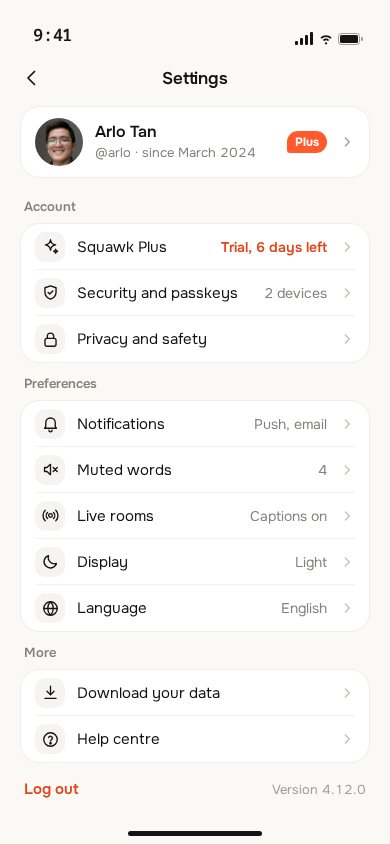
Squawk is a complete short post social app: welcome, topic picks, sign in and a code check, a For you feed with a live room strip, a post with its replies, compose with a photo and a keyboard, a full screen photo, explore with trends, search results, a trending topic with a poll, live rooms and a room with speakers, captions and listeners, messages and a chat, activity, your profile and someone else's, followers, saved folders, insights, a Plus plan with checkout and confirmation, and settings. White and warm stone with ink and one vermillion accent.
| Detail | Value |
|---|---|
| Screen type | Settings |
| App | Squawk: Short posts and live conversation |
| Category | Social |
| Design language | Minimal, light |
| Type | Bricolage Grotesque for headings, Onest for text |
| Colours | #ffffff background, #f5f4f0 surface, #141414 text, #85827a text-muted, #ff5a2c accent, #ffffff accent-contrast, #fff1eb secondary, #efeee9 border, #e2461b danger |
What this screen says
- Settings
- Arlo Tan@arlo · since March 2024
- Plus
- Account
- Squawk Plus Trial, 6 days left
- Security and passkeys 2 devices
- Privacy and safety
- Preferences
- Notifications Push, email
- Muted words 4
- Live rooms Captions on
- Display Light
- Language English
- More
- Download your data
- Help centre
- Log outVersion 4.12.0
Around it in Squawk
More settings screens
- Huddle Settings: Interest groups and meetups
- Glade Settings: Photo and clip social network
- Onair Settings: Live streaming
- Drift Settings: Reels and voice rooms
- Glitz Settings: Party live streaming
- Hearth Privacy: Messenger for trips and circles
- Chirp Settings: Messenger with file sharing
- Banter Privacy: Live messenger
- Natter Settings: Minimal messenger
- Nearly Settings: Dating by crossed paths
- Linkup Settings: Professional network and jobs
- Quorum Settings: Questions and expert answers
Every social app settings screen
What makes a good settings screen
- Group options into clear sections. Account, notifications, privacy, appearance and help, with headings, so people scan to the right group.
- Label settings by their effect. "Daily reminder at 8:00" is clearer than "Reminders". Add a short description under options that need one.
- Use the right control. Toggles for on and off, a row that opens a list for choices, and sliders only for ranges.
- Apply changes immediately. Most mobile settings take effect when changed, with no Save button to forget.
The full settings screen guide and every example
Remix Squawk free: describe your own app and it is drawn in this design. Or get its files from $10: Figma, React Native, SwiftUI, Flutter and HTML.