Templates · Settings screens · Social app · Nearly
Nearly Settings screen
A settings screen from Nearly, a dating by crossed paths app template in a Glass style. Screen 25 of 25.
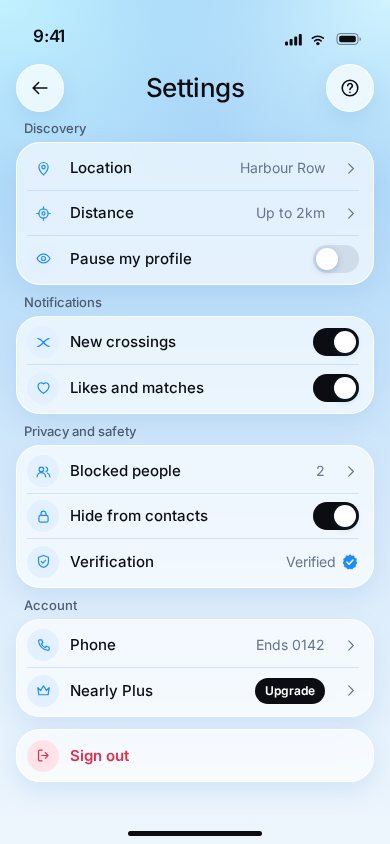
Nearly is a complete dating app built around the people you walk past: onboarding, sign in, profile setup, a home deck of big portrait cards with match scores, a radar map of who is nearby, explore and filters, a profile with every place you crossed, likes, a match moment, chats, date planning, hotspots, insights, a membership paywall, profile and settings. Sky blue and frosted glass with a playful headline font.
| Detail | Value |
|---|---|
| Screen type | Settings |
| App | Nearly: Dating by crossed paths |
| Category | Social |
| Design language | Glass, light |
| Type | Inter |
| Colours | #e6f3ff background, #ffffff surface, #0b0d12 text, #66758c text-muted, #1d8cf8 accent, #ffffff accent-contrast, #0b0d12 secondary, #d6e6f7 border, #ff4d6a danger |
What this screen says
- Settings
- Discovery
- LocationHarbour Row
- DistanceUp to 2km
- Pause my profile
- Notifications
- New crossings
- Likes and matches
- Privacy and safety
- Blocked people2
- Hide from contacts
- VerificationVerified
- Account
- PhoneEnds 0142
- Nearly PlusUpgrade
- Sign out
Around it in Nearly
More settings screens
- Onair Settings: Live streaming
- Drift Settings: Reels and voice rooms
- Glitz Settings: Party live streaming
- Hearth Privacy: Messenger for trips and circles
- Chirp Settings: Messenger with file sharing
- Banter Privacy: Live messenger
- Natter Settings: Minimal messenger
- Linkup Settings: Professional network and jobs
- Quorum Settings: Questions and expert answers
- Backer Settings: Support creators with memberships
- Pledge Settings: Back creative projects
- Civic Settings: Report issues and city services
Every social app settings screen
What makes a good settings screen
- Group options into clear sections. Account, notifications, privacy, appearance and help, with headings, so people scan to the right group.
- Label settings by their effect. "Daily reminder at 8:00" is clearer than "Reminders". Add a short description under options that need one.
- Use the right control. Toggles for on and off, a row that opens a list for choices, and sliders only for ranges.
- Apply changes immediately. Most mobile settings take effect when changed, with no Save button to forget.
The full settings screen guide and every example
Remix Nearly free: describe your own app and it is drawn in this design. Or get its files from $10: Figma, React Native, SwiftUI, Flutter and HTML.