Templates · Settings screens · Social app · Linkup
Linkup Settings screen
A settings screen from Linkup, a professional network and jobs app template in an Enterprise style. Screen 25 of 25.
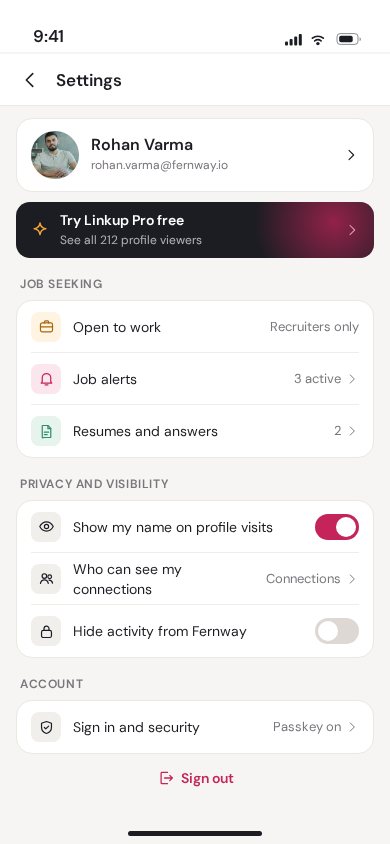
Linkup is a complete professional network: welcome, goals and sign in, a home feed of posts with reactions, a post with its comments, writing a post, your profile with experience, another member's profile, skills with endorsements, my network with invitations, people search, jobs with recommendations and filtered results, a job with a quick apply flow, review and confirmation, an applications tracker, messages and a conversation, notifications, who viewed your profile, a company page, a Pro plan and settings. Warm white and graphite with a single raspberry.
| Detail | Value |
|---|---|
| Screen type | Settings |
| App | Linkup: Professional network and jobs |
| Category | Social |
| Design language | Enterprise, light |
| Type | Bricolage Grotesque for headings, DM Sans for text |
| Colours | #f6f5f3 background, #ffffff surface, #1c1d22 text, #7a767c text-muted, #c4245a accent, #fbe6ee accent-tint, #1c1d22 secondary, #f0a43a highlight, #ebe7e3 border, #2f8f6a success |
What this screen says
- Settings
- Rohan Varmarohan.varma@fernway.io
- Try Linkup Pro freeSee all 212 profile viewers
- Job seeking
- Open to work Recruiters only
- Job alerts 3 active
- Resumes and answers 2
- Privacy and visibility
- Show my name on profile visits
- Who can see my connections Connections
- Hide activity from Fernway
- Account
- Sign in and security Passkey on
- Sign out
Around it in Linkup
More settings screens
- Ripple Settings: Voice notes social
- Duo Settings: An app for two
- Soapbox Settings: Weekly debates and polls
- Ballot Settings: Settle it on paper
- Murmur Settings: Chat rooms for art lovers
- Wink Settings: Video first dating
- Snoot Settings: Social app for pets
- Huddle Settings: Interest groups and meetups
- Glade Settings: Photo and clip social network
- Onair Settings: Live streaming
- Drift Settings: Reels and voice rooms
- Glitz Settings: Party live streaming
Every social app settings screen
What makes a good settings screen
- Group options into clear sections. Account, notifications, privacy, appearance and help, with headings, so people scan to the right group.
- Label settings by their effect. "Daily reminder at 8:00" is clearer than "Reminders". Add a short description under options that need one.
- Use the right control. Toggles for on and off, a row that opens a list for choices, and sliders only for ranges.
- Apply changes immediately. Most mobile settings take effect when changed, with no Save button to forget.
The full settings screen guide and every example
Remix Linkup free: describe your own app and it is drawn in this design. Or get its files from $10: Figma, React Native, SwiftUI, Flutter and HTML.